
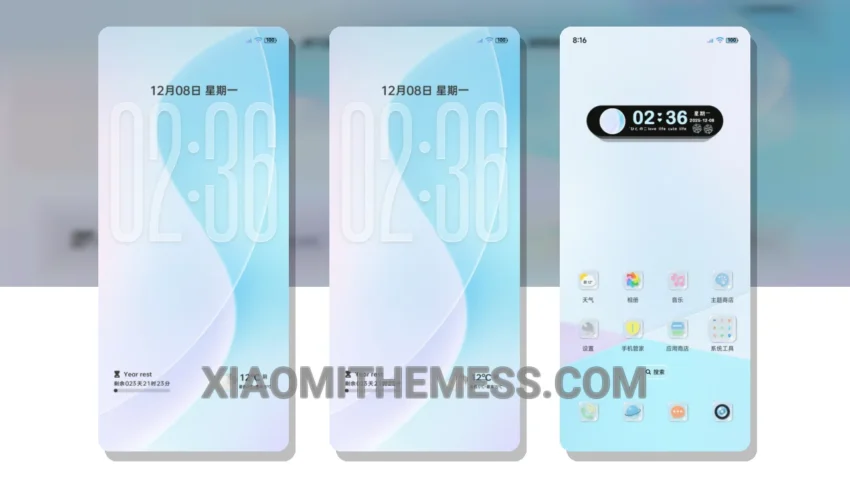
The Blue Glass Icon HyperOS theme is a great way to customize your Xiaomi phone. It has a clean and minimalist design that I really appreciate. The theme is fully compatible with HyperOS, MIUI 12, MIUI 13, and MIUI 14, making it a great option for Xiaomi and Redmi phone users.
The theme has a pastel aesthetic that gives it a unique and elegant look. The icons are designed with a blue glass effect that adds a touch of sophistication to the overall design. The theme also supports dark mode optimization, which helps to reduce battery consumption and provides a better viewing experience.
One of the best things about this theme is that it is very lightweight and does not cause any lag or battery drain. The theme is also very easy to apply, and the instructions are straightforward. The size of the theme is 25.4 MB, which is relatively small compared to other themes.
Overall, I think the Blue Glass Icon HyperOS theme is a great option for anyone looking to customize their Xiaomi phone. The theme has a unique and elegant design, and it is fully compatible with HyperOS, MIUI 12, MIUI 13, and MIUI 14. The only caveat is that the theme may not be suitable for users who prefer a more vibrant and colorful design.
In my testing, I found the theme to be very stable and easy to use. The theme does not cause any lag or battery drain, and the design is very aesthetically pleasing. To be honest, I think this theme is a great option for anyone looking to customize their Xiaomi phone with a clean and minimalist design.
Conclusion
In conclusion, the Blue Glass Icon HyperOS theme is a great option for Xiaomi and Redmi phone users who want to customize their phone with a clean and minimalist design. The theme is fully compatible with HyperOS, MIUI 12, MIUI 13, and MIUI 14, and it supports dark mode optimization for a better battery life and viewing experience.
Theme Information
🛠️ How to Install This MTZ Theme
- Download the MTZ file to your device.
- Open the official Themes app and go to your profile.
- Import & Apply the downloaded file.