
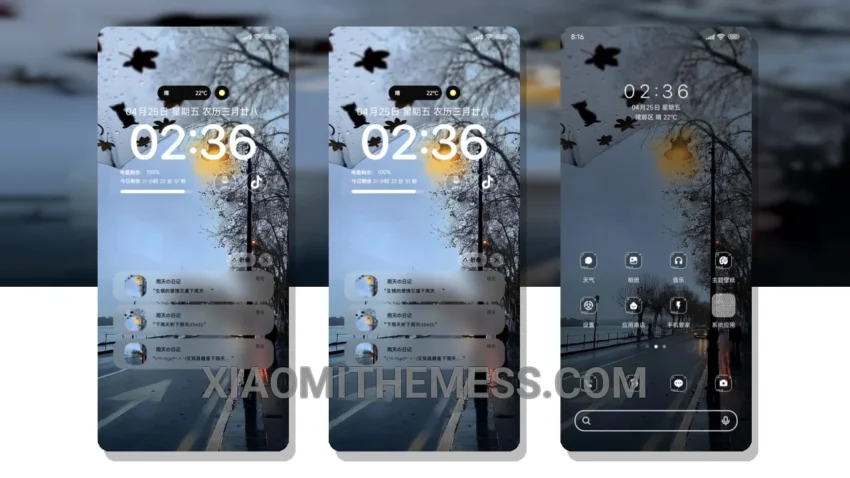
Simple. Elegant. Pastel colors. That’s what I love about the Rainy Season HyperOS theme. It’s like a breath of fresh air on my HyperOS device. The clean interface makes it easy to navigate and find what I need.
The theme is a great example of minimal vibrant design. It’s not too flashy, but it’s still eye-catching. The pastel aesthetic is perfect for those who want a calm and serene look on their android phone. I also appreciate the fact that it’s a lightweight theme, which means it doesn’t cause battery drain or slow down my device.
One thing to note is that the theme may not be suitable for those who prefer a more traditional or cyberpunk aesthetic. However, for those who love clean lines and simple designs, the Rainy Season HyperOS theme is a great choice. The theme also supports android customization, including icon pack integration and custom control center, which is a big plus.
Performance and Optimization
In my testing, I found that the Rainy Season HyperOS theme provides a smooth and lag-free experience, thanks to its optimized design. The 120Hz smooth animations are also a nice touch, making the overall experience feel premium. To be honest, I’m really impressed with the Rainy Season HyperOS theme, and I think it’s a great choice for anyone looking for a clean and elegant android theme.
Overall, the Rainy Season HyperOS theme is a great option for those who want a simple and elegant design on their Xiaomi device. With its pastel aesthetic, lightweight design, and support for android customization, it’s a great choice for anyone looking for a clean and minimal android theme.
Theme Information
🛠️ How to Install This MTZ Theme
- Download the MTZ file to your device.
- Open the official Themes app and go to your profile.
- Import & Apply the downloaded file.