
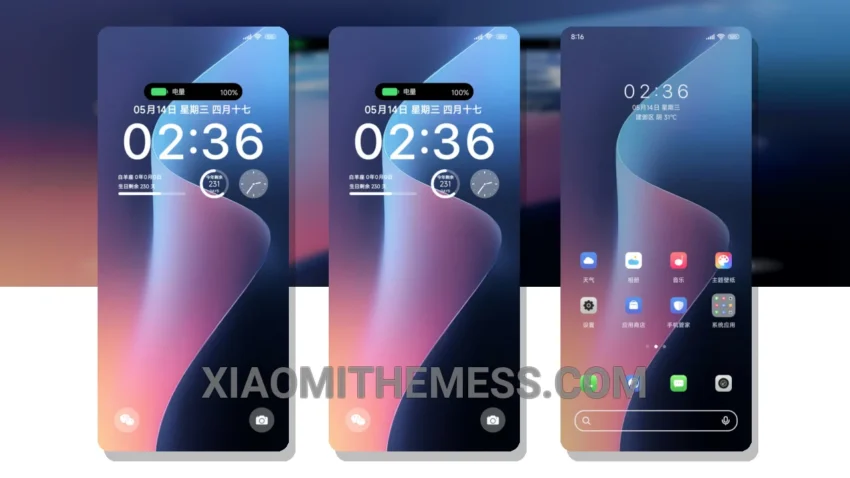
Love at first sight. That’s what I felt when I saw the Duocai Shuangmoshi theme. Simple, elegant, and pastel aesthetic themes are my thing. This theme delivers. With its clean lines and minimal design, it’s perfect for those who hate clutter.
It works seamlessly with HyperOS, MIUI 12, MIUI 13, and MIUI 14. No issues, no glitches. Just a smooth, lag-free experience. I also appreciate the attention to detail. The theme’s custom control center and redesigned status bar are thoughtful touches.
And with the icon pack integration, I can personalize my home screen to my heart’s content. The theme may not be suitable for those who prefer a more cyberpunk aesthetic. But for me, the Duocai Shuangmoshi theme’s understated elegance is a major draw.
Key Features
The Duocai Shuangmoshi theme offers a range of features that make it stand out. Its clean interface and premium UI make it a joy to use. The theme is also optimized for dark mode and features 120Hz smooth animations.
To be honest, I’m thoroughly enjoying the Duocai Shuangmoshi theme. It’s a great example of android customization done right. Give it a try, and you might just fall in love like I did.
The theme is fully compatible with a range of devices, including Xiaomi and Redmi phones. It’s available for download on the Xiaomi Themes App, and it’s easy to install and apply.
Theme Information
🛠️ How to Install This MTZ Theme
- Download the MTZ file to your device.
- Open the official Themes app and go to your profile.
- Import & Apply the downloaded file.