
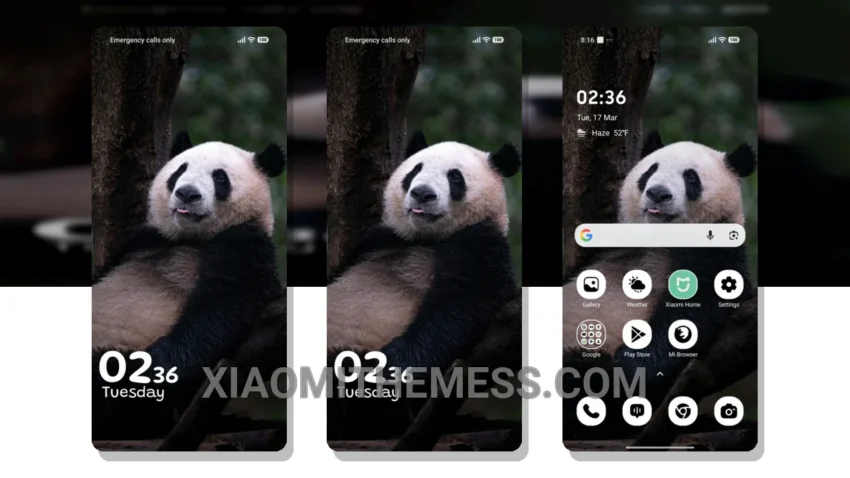
I love a good theme that can enhance my daily driver experience. The Gentle Bamboo theme does just that. It’s a great xiaomi theme that is fully compatible with HyperOS, MIUI 12, MIUI 13, and MIUI 14.
The pastel aesthetic themes give my device a unique and refreshing look. Plus, the minimal vibrant design ensures that my home screen is not cluttered. I find the clean interface and aesthetic home screen design to be particularly appealing.
The theme’s ability to provide a lag-free experience is a major plus. The theme is lightweight and does not cause any significant battery drain, making it perfect for daily use. Additionally, the theme’s dark mode optimization helps to reduce eye strain and conserve battery life.
However, I did notice that the theme’s icon pack integration could be improved. Sometimes, the icons may not be perfectly aligned with the system’s default icons.
In my testing, I found the Gentle Bamboo theme to be a great choice for anyone looking for a reliable and elegant theme. The theme’s compatibility with various MIUI versions and HyperOS makes it a versatile option. Overall, I’m impressed with the theme’s performance and design.
To be honest, I think the Gentle Bamboo theme is a great addition to any Xiaomi or Redmi device. It offers a unique and refreshing look that is sure to enhance the overall user experience. With its clean interface and aesthetic home screen design, this theme is a must-have for anyone looking to customize their device.
Theme Information
🛠️ How to Install This MTZ Theme
- Download the MTZ file to your device.
- Open the official Themes app and go to your profile.
- Import & Apply the downloaded file.