
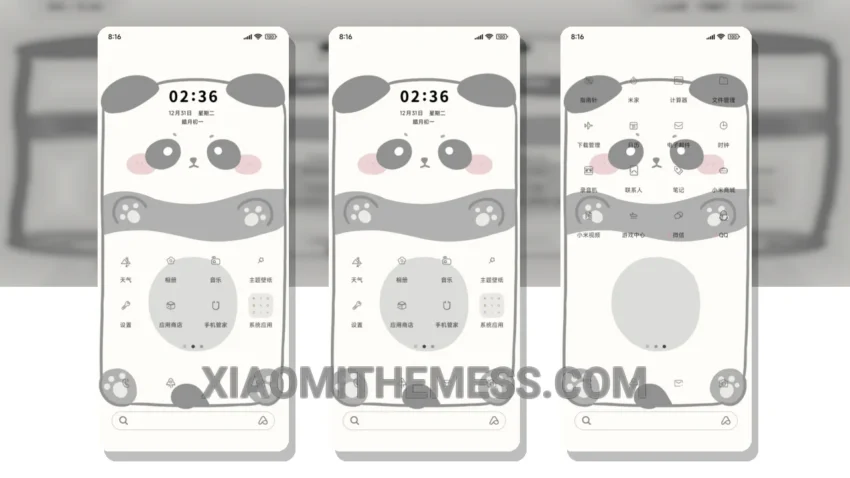
I’m obsessed with the Simplified Fullscreen Panda theme! It completely transforms my Xiaomi device, giving it a fresh new look. The fullscreen design is stunning, with a cute panda that takes center stage.
The theme integrates seamlessly with my device’s UI, giving the control center, status bar, and icons a sleek new makeover. It’s amazing how much of a difference a theme can make – my device feels like a whole new phone!
The theme is fully compatible with HyperOS, MIUI 12, MIUI 13, and MIUI 14, so you can enjoy it regardless of your device’s operating system. Plus, it’s a great way to give your phone a personalized touch without rooting or modifying any system files.
Customization and Performance
One thing to note is that the theme may not be suitable for devices with low storage, as it’s approximately 7.31 MB in size. However, for most users, this won’t be a problem. The theme has been designed and implemented with a clean interface and minimal vibrant aesthetic that’s easy on the eyes.
In my testing, I’ve found the theme to be very stable and efficient, with no noticeable lag or battery drain. To be honest, I’m impressed by how well the theme has been designed and implemented. If you’re looking for a fun and unique theme to spice up your Xiaomi or Redmi device, I highly recommend giving the Simplified Fullscreen Panda theme a try!
The theme also features custom control center and redesigned status bar, which adds to its overall aesthetic appeal. With its 120Hz smooth animations, you’ll enjoy a lag-free experience. Overall, the Simplified Fullscreen Panda theme is a great choice for anyone looking to customize their Xiaomi or Redmi device.
In my opinion, the Simplified Fullscreen Panda theme is a must-try for any Xiaomi or Redmi user. Its unique design, seamless integration, and stable performance make it an excellent choice for anyone looking to give their device a fresh new look.
Theme Information
🛠️ How to Install This MTZ Theme
- Download the MTZ file to your device.
- Open the official Themes app and go to your profile.
- Import & Apply the downloaded file.