
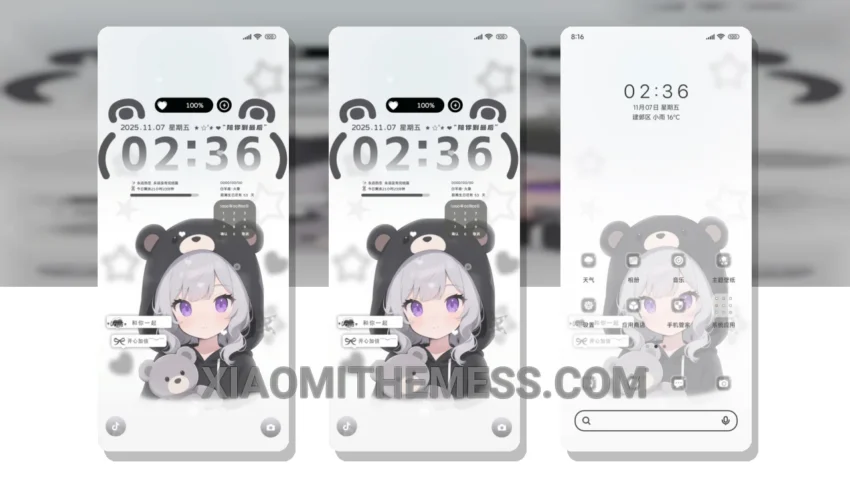
I’m obsessed with dark mode. It’s sleek, it’s sexy, it’s a battery saver. That’s why I’m always on the lookout for new themes that can give my Xiaomi phone a fresh look. The Dark Love You theme is one of them. What really stands out is its clean interface and minimal vibrant design.
This theme is fully compatible with HyperOS, MIUI 12, MIUI 13, and MIUI 14. It’s a great option for those who want a lightweight theme that won’t drain their battery. The dark mode optimization is impressive, and the overall performance is top-notch.
Customization Options
In terms of customization, the Dark Love You theme offers a range of options. You can customize the lock screen, notification shade, and even the control center. The theme also supports icon pack integration, which allows you to change the look of your icons.
One of the highlights of this theme is its ability to provide a lag-free experience. The animations are smooth, and the overall performance is top-notch. However, one caveat is that it may not be suitable for those who prefer a more colorful and vibrant theme.
To be honest, I’m really impressed with the Dark Love You theme. It’s a great option for those who want a dark mode theme that’s both stylish and functional. The theme is easy to apply, and the instructions are straightforward. Overall, I’d definitely recommend this theme to anyone looking for a new look for their Xiaomi phone.
Theme Information
🛠️ How to Install This MTZ Theme
- Download the MTZ file to your device.
- Open the official Themes app and go to your profile.
- Import & Apply the downloaded file.