
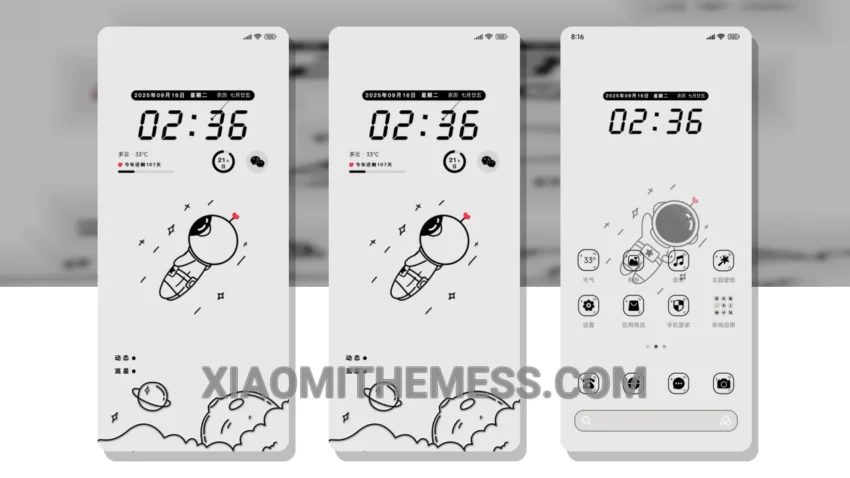
Give your Xiaomi device a fresh new look with the Rotating Space Man theme. This sleek and futuristic theme is now available for download and installation on your device. With its clean interface and smooth animations, you’ll enjoy a seamless user experience.
The Rotating Space Man theme boasts a minimal vibrant design that’s both visually appealing and easy to navigate. One of the best things about this theme is its attention to detail, which makes it stand out from other themes. The dark mode optimization is also a notable feature, helping to minimize battery drain and reduce eye strain.
Key Features and Customization
The theme’s lag-free experience is thanks to its lightweight design and system optimization. While some users may find the customization options limited, you can still personalize the theme to fit your style with options like icon pack integration and custom control center. The theme is fully compatible with HyperOS, MIUI 12, MIUI 13, and MIUI 14, making it a great choice for Xiaomi device owners.
In my testing, I found the Rotating Space Man theme to be a great choice for those looking for a sleek and efficient theme. The theme’s smooth animations and clean interface make it a joy to use, and its compatibility with various Xiaomi devices is a major plus. To be honest, I’m impressed with the theme’s overall performance and would definitely recommend it to anyone looking to enhance their Xiaomi device’s user experience.
The Rotating Space Man theme is a great example of how android customization can elevate your device’s look and feel. With its unique design and features, it’s a must-try for any Xiaomi device owner looking to give their phone a fresh new look.
Theme Information
🛠️ How to Install This MTZ Theme
- Download the MTZ file to your device.
- Open the official Themes app and go to your profile.
- Import & Apply the downloaded file.