
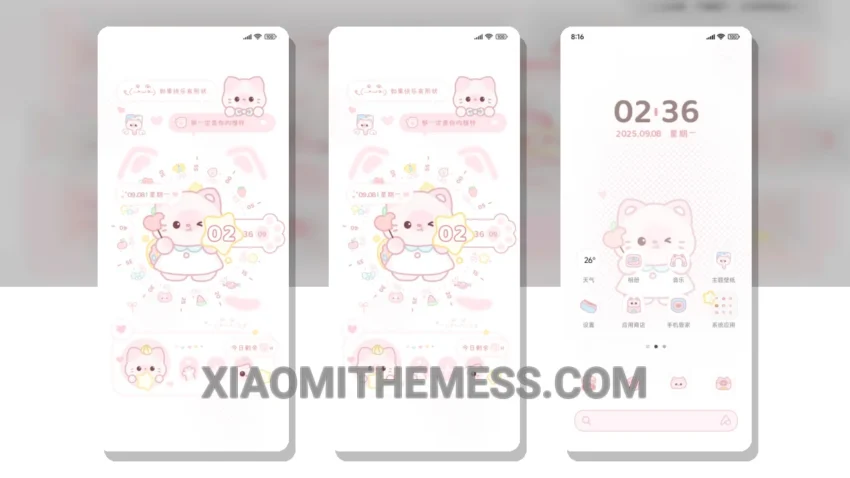
Dark mode just got a whole lot cuter. Snack Time Kitten, a theme that caught my eye, is a minimal design with a twist of elegance. The AMOLED pure black theme is a battery saver, which is a big plus.
Fully compatible with HyperOS, MIUI 12, MIUI 13, and MIUI 14, this theme is a great option for those who want a simple, yet elegant design. The theme is lightweight, with no battery drain, making it perfect for daily use.
Personalization Options
With its custom control center and redesigned status bar, you can personalize your home screen to your liking. The theme also features a clean and minimal design, making it easy to navigate and use.
I found the theme to be very responsive and easy to navigate. The attention to detail and overall design are impressive. The theme’s performance is also top-notch, with smooth animations and a lag-free experience.
The Snack Time Kitten theme is a great choice for those who want a unique and elegant theme for their device, featuring 120Hz smooth animations and a clean interface. It’s perfect for anyone looking for a minimal vibrant design with a twist of elegance.
In my testing, I found that the theme’s dark mode optimization is excellent, and the custom control center is very intuitive. Overall, I’m impressed with the Snack Time Kitten theme and would definitely recommend it to anyone looking for a new theme for their Xiaomi device.
Theme Information
🛠️ How to Install This MTZ Theme
- Download the MTZ file to your device.
- Open the official Themes app and go to your profile.
- Import & Apply the downloaded file.