
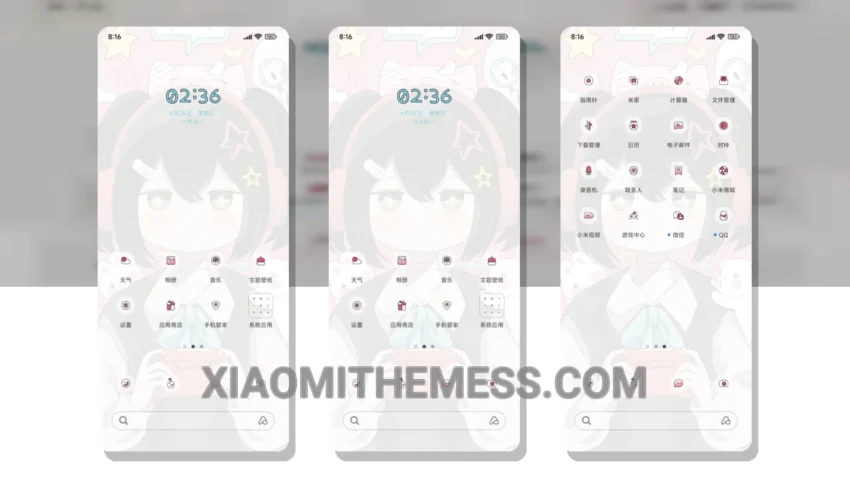
Game On, which translates to ‘Starting the game with lots of effects’, brings a fresh and exciting look to your Xiaomi device. I love how it completely transforms the default look with its aesthetic pastel colors and minimalistic design.
This theme is fully compatible with HyperOS, MIUI 12, MIUI 13, and MIUI 14, making it a great option for anyone looking to give their device a new look. One of the best things about this theme is how it changes the control center, status bar, and icons to give your device a unique and personalized feel.
The theme’s clean interface and premium UI make it a joy to use, and the fact that it’s lag-free and doesn’t cause any battery drain is a huge plus. However, some users may find the theme’s font style to be a bit too bold, which can be a caveat for those who prefer a more subtle look.
In terms of customization, the Game On theme offers a range of options, including icon pack integration and custom boot animation. You can also use the built-in theme editor to further customize the theme to your liking.
To be honest, I’m really impressed with the Game On theme and how it’s brought a new level of excitement to my Xiaomi device. The theme’s 120Hz smooth animations and system optimization make it a great choice for anyone looking to enhance their device’s performance.
Theme Information
🛠️ How to Install This MTZ Theme
- Download the MTZ file to your device.
- Open the official Themes app and go to your profile.
- Import & Apply the downloaded file.