
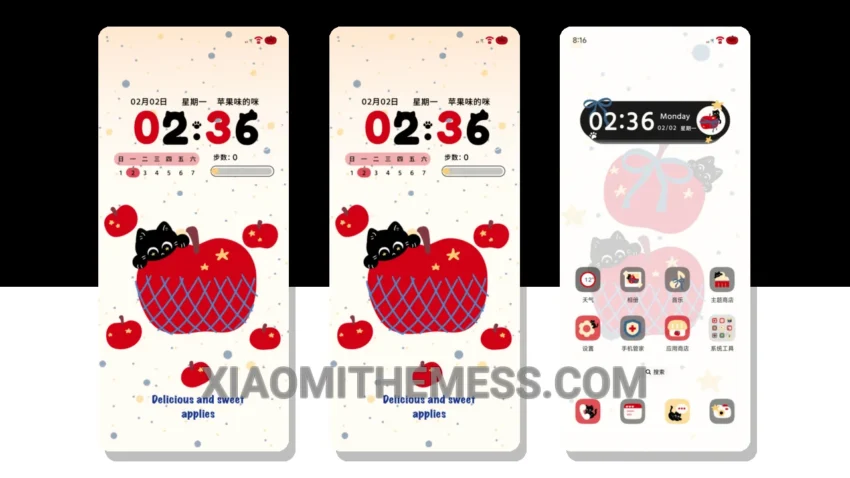
Dark mode is my go-to. It’s elegant, saves battery, and reduces eye strain. The Kitty Steps Eat Apple theme caught my attention with its cute and playful design. This theme transforms your Xiaomi phone into a unique device.
The Kitty Steps Eat Apple theme is fully compatible with HyperOS, MIUI 12, 13, and 14, making it a great option for Xiaomi and Redmi phone users. The theme is also lightweight, which means it won’t cause any battery drain or lag on your device.
I love how the theme supports Android customization. You can easily integrate your favorite icon packs and customize the control center to your liking. The theme features a clean and minimal design, making it easy to navigate and use.
One thing to note is that some users may find the theme’s design too cute or childish. However, the Kitty Steps Eat Apple theme is a great option for those looking for a unique and fun way to customize their Xiaomi phone.
In my testing, I found the Kitty Steps Eat Apple theme to be a great addition to my Xiaomi phone. The theme’s seamless integration with HyperOS and MIUI made it easy to apply and use, and the customization options were plentiful. To be honest, I was impressed by the theme’s ability to completely transform my phone’s look and feel.
Customization Options
The Kitty Steps Eat Apple theme offers a range of customization options, including the ability to change the control center, status bar, and icons. This gives your phone a new and personalized look. The theme also features dark mode optimization, which helps to reduce battery drain and eye strain.
The theme’s clean interface and minimal aesthetic make it easy to navigate and use, even for those who prefer a more subtle design. Overall, the Kitty Steps Eat Apple theme is a great option for those looking for a unique and customizable theme for their Xiaomi phone.
Theme Information
🛠️ How to Install This MTZ Theme
- Download the MTZ file to your device.
- Open the official Themes app and go to your profile.
- Import & Apply the downloaded file.