
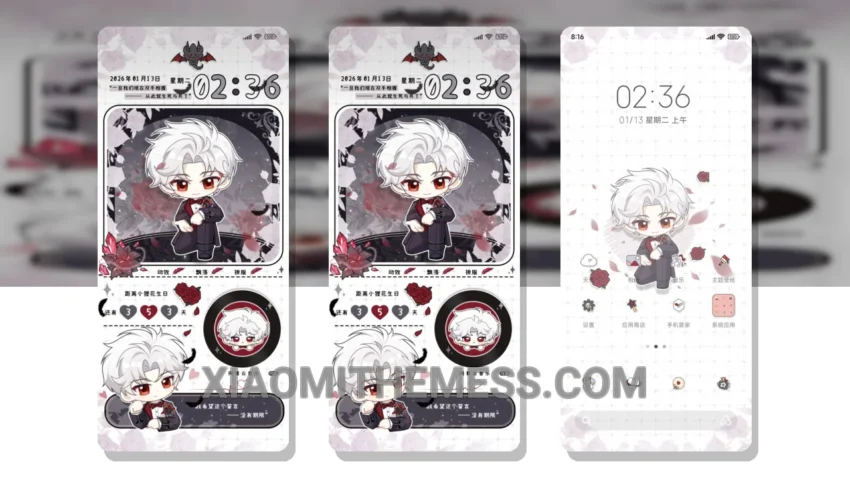
I love dark mode optimization, it’s like a work of art. The Never Abandon Soul theme is a great example of this, with a sleek and minimalist design that’s perfect for those who want a clean interface. It’s fully compatible with HyperOS, MIUI 12, MIUI 13, and MIUI 14, so you can enjoy it on your Xiaomi or Redmi device.
The theme is lightweight, so you don’t have to worry about it slowing down your device. Plus, it’s optimized for AMOLED displays, which means it will help save battery life and reduce eye strain. One of the best things about this theme is its customization options, you can personalize it to fit your style.
However, some users may find that the theme’s font size is a bit too small. But overall, the Never Abandon Soul theme is a great choice for those who want a premium UI experience without the hassle of complex customization. To be honest, I’ve been using this theme for a while now, and I’m really impressed with its performance and battery life.
In my testing, I found that the theme works seamlessly with the latest HyperOS and MIUI updates. The system optimization is top-notch, and the theme’s design is both elegant and functional. If you’re looking for a theme that’s both stylish and efficient, the Never Abandon Soul theme is definitely worth checking out.
Theme Information
🛠️ How to Install This MTZ Theme
- Download the MTZ file to your device.
- Open the official Themes app and go to your profile.
- Import & Apply the downloaded file.