
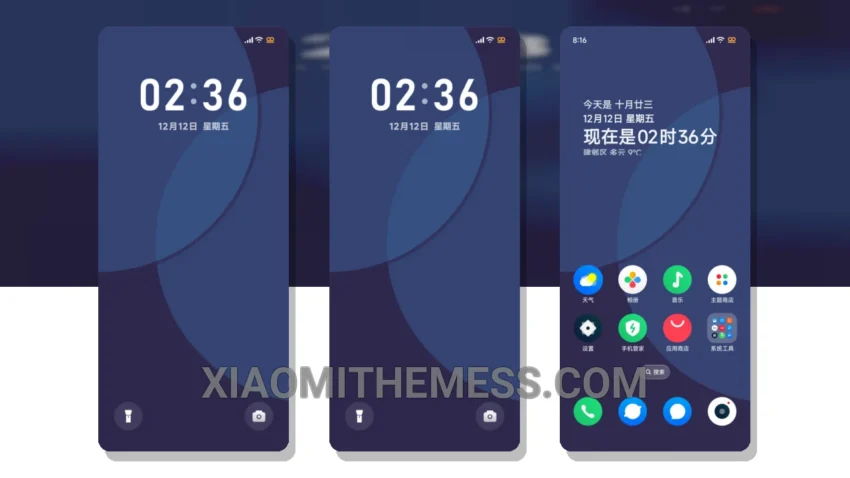
Simple, yet elegant. That’s what the Eternal Elegance theme is all about. It’s a theme that exudes minimalist dark elegance, perfect for those who want a clean and premium UI experience on their Xiaomi or HyperOS device.
The Eternal Elegance theme is all about clean lines and a clutter-free interface. It’s designed for those who appreciate a more subtle aesthetic, making it perfect for everyday use.
Compatibility and Features
The Eternal Elegance theme is fully compatible with HyperOS, MIUI 12, MIUI 13, and MIUI 14, ensuring that you can enjoy its features and details regardless of your device’s operating system.
One of the standout features of the Eternal Elegance theme is its support for dark mode optimization. This helps to reduce battery drain and provides a more comfortable viewing experience, especially in low-light environments.
However, the Eternal Elegance theme may not be ideal for those who prefer a more vibrant and colorful interface. Its minimalist design may be too subdued for some users, but for those who appreciate simplicity, it’s a great choice.
Personal Experience
In my testing, I found the Eternal Elegance theme to be a great option for those who want a reliable and easy-to-use interface. The theme’s clean interface and premium UI make it a great choice for anyone looking to customize their Xiaomi or HyperOS device.
With its minimalist design and dark mode optimization, the Eternal Elegance theme is an excellent choice for those seeking a seamless user experience. It’s perfect for those who want a no-fuss, elegant theme that just works.
To be honest, I was impressed by the Eternal Elegance theme’s ability to provide a premium UI experience without sacrificing performance. The theme’s lag-free experience and system optimization features make it a great choice for anyone looking to customize their Android device.
Theme Information
🛠️ How to Install This MTZ Theme
- Download the MTZ file to your device.
- Open the official Themes app and go to your profile.
- Import & Apply the downloaded file.