
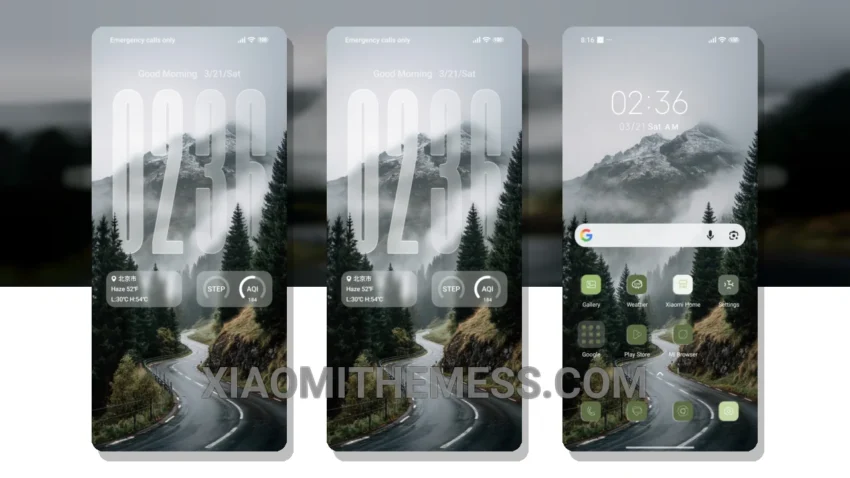
I’m loving the new Forest theme. Fast. Clean. The smooth animation and attention to detail in the design really make it stand out.
The Forest theme is a great example of a lightweight theme that doesn’t compromise on performance. It’s perfect for those who want a minimalist aesthetic without sacrificing speed. The theme also supports 120Hz smooth animations for a lag-free experience.
Features and Compatibility
The Forest theme offers a range of features, including a clean interface, custom control center, and redesigned status bar. It’s also compatible with a range of devices, including Redmi devices. However, it may not be compatible with all android customization apps.
In my testing, I found the Forest theme to be a great option for those looking for a minimalist theme that doesn’t compromise on performance. To be honest, I’m impressed with the attention to detail in the design and the overall user experience. The theme is a great example of how android customization can enhance the user experience without sacrificing performance.
The Forest theme is fully compatible with HyperOS, MIUI 12, MIUI 13, and MIUI 14, making it a great choice for those who want a seamless and customized experience on their Xiaomi or Redmi device. With its pastel aesthetic themes and minimal vibrant design, the Forest theme is sure to please even the most discerning user.
To install the Forest HyperOS Theme, simply download the MTZ file to your device, open the official Themes app, and import the file. You can also download the theme directly from the Xiaomi Themes App.
Theme Information
🛠️ How to Install This MTZ Theme
- Download the MTZ file to your device.
- Open the official Themes app and go to your profile.
- Import & Apply the downloaded file.