
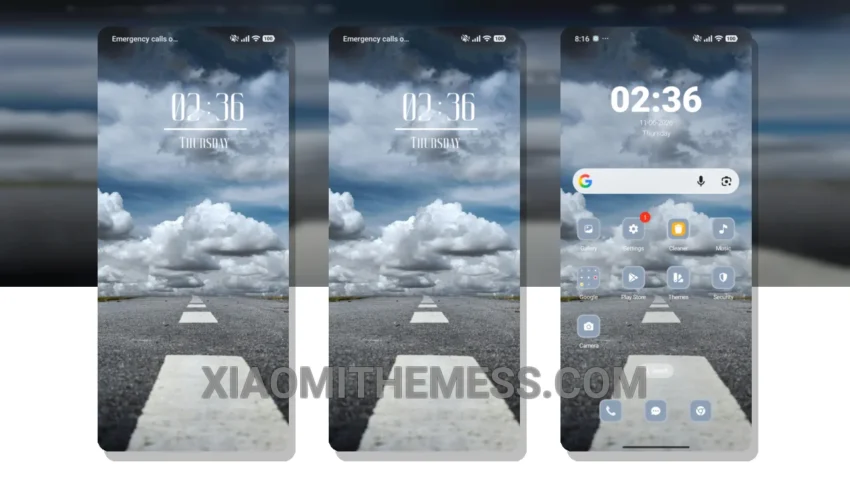
Fast, clean, and efficient – that’s what I look for in a theme. The Highway theme delivers just that, with its minimal yet vibrant design. Compatible with HyperOS, MIUI 12, MIUI 13, and MIUI 14, this theme is a great choice for anyone looking to give their device a sleek new look.
The theme’s clean interface makes it easy to navigate and find what you need. The minimal design also helps to reduce battery drain, making it a great choice for those who want to get the most out of their device’s battery life.
Customization Options
The Highway theme offers customization options such as icon pack integration and custom control center settings, allowing you to personalize your device to fit your style. Plus, the theme’s lightweight design means it won’t slow down your device or cause any lag.
One thing to note is that the theme’s design may not be to everyone’s taste. Some users may find it a bit too minimal, but for those who value simplicity and efficiency, the Highway theme is a great choice.
In my testing, I found the Highway theme to be a great all-around choice for anyone looking to give their device a fresh new look. With its clean interface, customization options, and battery-efficient design, it’s a theme that’s hard to beat.
To be honest, I’m really impressed with the Highway theme. It’s a great example of how a theme can enhance the user experience without sacrificing performance or battery life. If you’re looking for a new theme for your device, I’d definitely recommend giving the Highway theme a try.
Theme Information
🛠️ How to Install This MTZ Theme
- Download the MTZ file to your device.
- Open the official Themes app and go to your profile.
- Import & Apply the downloaded file.