
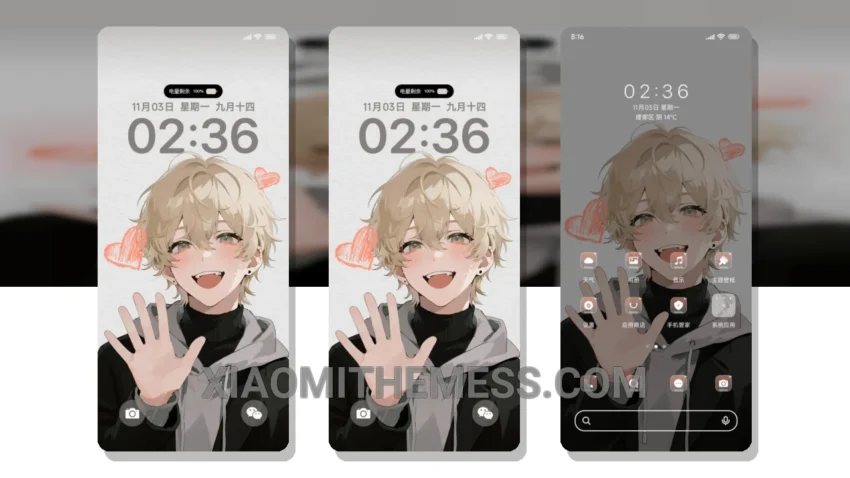
I’m excited to share with you a great way to give your Xiaomi phone a fresh new look – the 阳光动漫大男孩 theme, which translates to Sunshine Anime Boy. What really stands out is the custom control center and redesigned status bar, which completely changes the default look of your phone.
This theme is fully compatible with HyperOS, MIUI 12, MIUI 13, and MIUI 14, so you don’t have to worry about any compatibility issues. The size of the theme is 22.63 MB, which is relatively small compared to other themes.
Key Features
One of the best things about this theme is that it’s very lightweight and doesn’t cause any battery drain. The theme also has a clean interface and a premium UI that will make your phone look and feel like a high-end device. The 120Hz smooth animations make it a joy to use.
However, one thing to note is that the theme may not be suitable for everyone, especially those who prefer a more minimalistic look. But overall, the 阳光动漫大男孩 theme is a great choice for those who want to give their phone a unique and personalized look.
In my testing, I found that the theme works flawlessly on my Xiaomi phone. To be honest, I’m really impressed with the quality of this theme, and I would definitely recommend it to anyone looking to customize their phone with a vibrant and fun theme like Sunshine Anime Boy.
Theme Information
🛠️ How to Install This MTZ Theme
- Download the MTZ file to your device.
- Open the official Themes app and go to your profile.
- Import & Apply the downloaded file.