
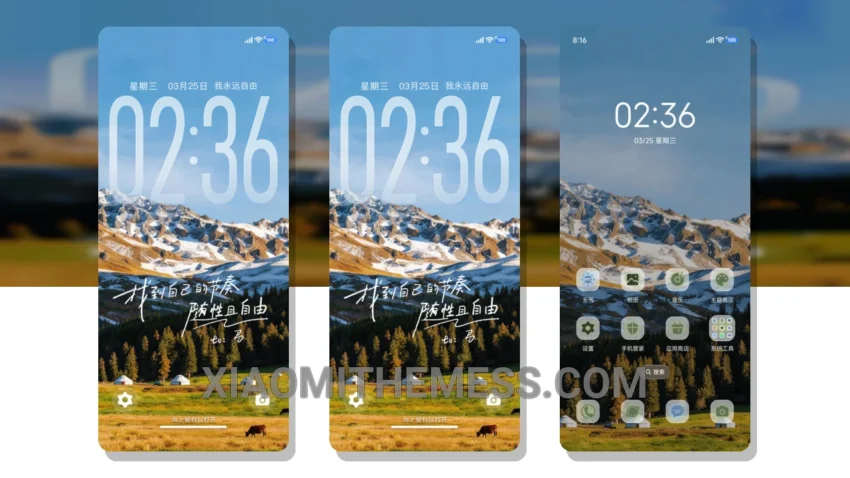
Simple, yet elegant. That’s what I love about the Freedom Top theme. It’s a great example of how minimalist design can make a big impact. With its clean lines and pastel colors, this theme is perfect for anyone who wants a sleek and modern look on their Xiaomi device.
The attention to detail in this theme is impressive. From the custom boot animation to the redesigned status bar, every element has been carefully crafted to create a cohesive and visually appealing experience. With its support for custom control center and interactive lockscreen widgets, you’ll have all the tools you need to customize your home screen to your heart’s content.
Compatibility and Performance
The Freedom Top theme is fully compatible with HyperOS, MIUI 12, MIUI 13, and MIUI 14, making it a great choice for a wide range of Xiaomi devices. And with its lightweight design, you don’t have to worry about it slowing down your device or draining your battery.
One of the best things about the Freedom Top theme is its ability to provide a lag-free experience, thanks to its optimization for 120Hz smooth animations. This means you can enjoy a seamless and responsive user interface, without any interruptions or delays.
However, the Freedom Top theme may not be suitable for everyone. If you prefer a more dramatic or bold look, you may want to consider a different theme. But if you’re looking for something clean, elegant, and easy to use, this theme is definitely worth checking out.
In my testing, I was really impressed with the Freedom Top theme. It’s a great example of how a well-designed theme can elevate the overall user experience on a Xiaomi device. To be honest, I think this theme is a must-have for anyone who wants a clean and minimalist look on their device, and is looking to customize their Android phone with a unique and stylish theme.
Theme Information
🛠️ How to Install This MTZ Theme
- Download the MTZ file to your device.
- Open the official Themes app and go to your profile.
- Import & Apply the downloaded file.