
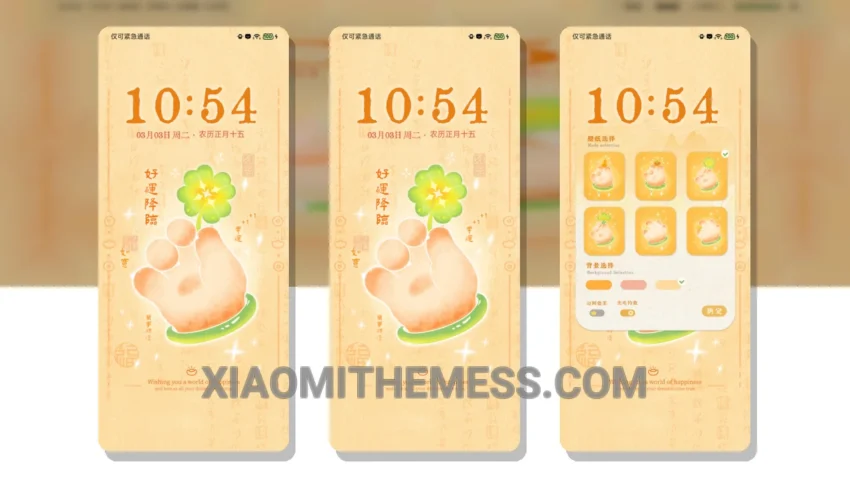
Soft pastel colors. Gentle icons. The Whisker Blessing theme is a must-have for any Xiaomi fan who appreciates a clean, minimalist design. This theme is all about simplicity and elegance, with a focus on creating a visually appealing interface that’s easy on the eyes.
The theme features a beautiful pastel color scheme, with soft and soothing colors that will calm your eyes. The icons are custom-designed, with a minimalist and vibrant style that looks great on any device. I love how the designer has put a lot of thought into creating a cohesive and visually appealing design.
The custom control center and redesigned status bar are just a few examples of the theme’s many great features. The theme is fully compatible with HyperOS, MIUI 12, MIUI 13, and MIUI 14 devices, so you can enjoy it on your Xiaomi device without any worries. One thing to note is that the theme may not be suitable for everyone’s taste, but for those who love cute and adorable designs, it’s a great choice.
In my testing, the Whisker Blessing theme has been a pleasure to use. The theme’s unique design and attention to detail make it a standout choice for anyone looking to customize their Xiaomi device. With its lag-free experience and system optimization, this theme is a great choice for anyone looking to customize their device without compromising on performance. To be honest, I’m really impressed with this theme, and I think you will be too.
Conclusion
Overall, the Whisker Blessing theme is a great choice for anyone looking to add a touch of elegance and simplicity to their Xiaomi device. With its beautiful pastel color scheme, custom-designed icons, and lag-free experience, this theme is a must-have for any Xiaomi fan who appreciates a clean and minimalist design.
Theme Information
🛠️ How to Install This MTZ Theme
- Download the MTZ file to your device.
- Open the official Themes app and go to your profile.
- Import & Apply the downloaded file.