
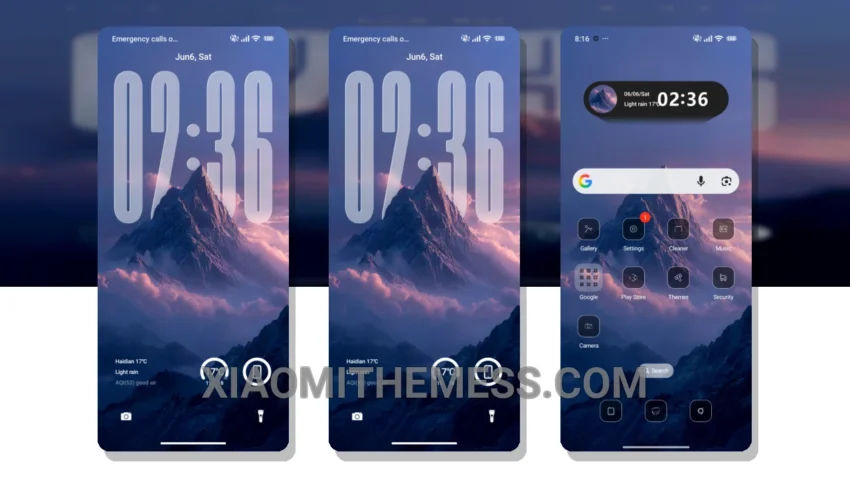
I adore the simplicity of dark interfaces, and the Mountain theme is no exception. It’s a great xiaomi theme that offers a clean and minimal design. Dark mode optimization is its strong suit, reducing eye strain and saving battery life.
The Mountain theme is fully compatible with HyperOS, MIUI 12, MIUI 13, and MIUI 14, making it a great option for Xiaomi and Redmi devices. It’s also lightweight, which means it won’t cause any battery drain or lag on your device.
Key Features and Customization
The Mountain theme boasts an AMOLED pure black theme, providing a sleek and premium look. Its 120Hz smooth animations ensure a lag-free experience. For those who want to personalize their device, the Mountain theme offers a range of options, including custom control center, redesigned status bar, and advanced widgets.
Some users might find the theme’s design a bit too minimal, but for me, that’s part of its charm. The Mountain theme supports icon pack integration, volume panel customizer, and dynamic island integration, making it a great option for those who want to customize their android phone.
To be honest, I’m impressed with the Mountain theme’s performance and design. It’s a great option for those who want a clean and minimal theme that’s optimized for dark mode. The theme’s compatibility with HyperOS, MIUI 12, MIUI 13, and MIUI 14 makes it a great choice for Xiaomi and Redmi devices.
Theme Information
🛠️ How to Install This MTZ Theme
- Download the MTZ file to your device.
- Open the official Themes app and go to your profile.
- Import & Apply the downloaded file.