
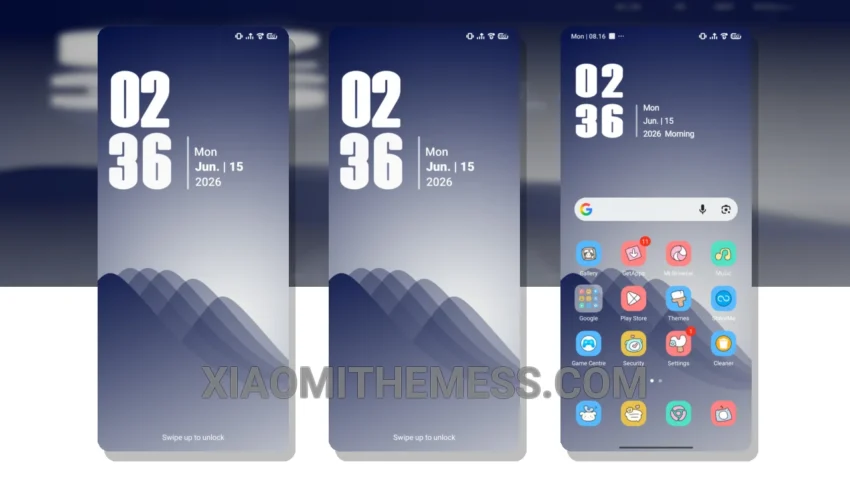
Fast.
Clean interfaces matter. HyperF1 theme delivers.
Fully compatible with HyperOS, MIUI 12, MIUI 13, and MIUI 14, this theme offers a unique blend of clean interface and smooth animations.
With a size of 8.56 MB, it’s lightweight and easy to download.
One key highlight is the theme’s support for dark mode optimization, providing a premium UI experience.
The theme also features a lag-free experience, making it perfect for those who value performance.
In terms of customization, the theme offers a range of options, including custom control center and redesigned status bar.
However, one potential caveat is that the theme may not be suitable for devices with lower specifications, as it requires a certain level of system optimization to run smoothly.
Overall, the HyperF1 theme is a great choice for those looking for a minimal vibrant theme with a unique aesthetic.
To apply the theme, simply download the MTZ file and import it to the theme store on your Xiaomi device.
In my testing, I found the theme to be highly responsive and battery efficient, with no noticeable battery drain.
To be honest, I’m impressed with the level of detail and care that has gone into designing this theme.
It’s a must-try for any Xiaomi user looking to elevate their phone’s interface to the next level.
Theme Information
🛠️ How to Install This MTZ Theme
- Download the MTZ file to your device.
- Open the official Themes app and go to your profile.
- Import & Apply the downloaded file.