
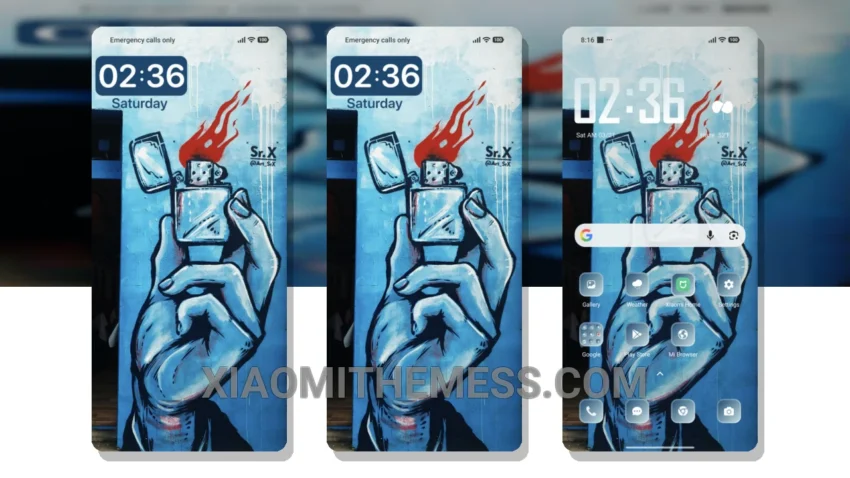
Simple. Elegant. Pastel perfection. That’s what the Blue Wall theme is all about. I love how it brings a sense of calm to my home screen. The theme’s clean interface is what makes it so appealing.
The Blue Wall theme is fully compatible with HyperOS, MIUI 12, MIUI 13, and MIUI 14, so you don’t have to worry about any compatibility issues. The theme’s ability to provide a lag-free experience is a major plus. The 120Hz smooth animations make navigation a breeze.
The dark mode optimization is another great feature, helping to save battery life. The Glassmorphism UI adds a nice touch of sophistication to the overall design. One thing to note is that the theme’s customization options are somewhat limited, but the icon pack integration and custom control center options are a nice touch.
What Makes the Blue Wall Theme Special
The Blue Wall theme is a great example of how a simple design can be both elegant and functional. The pastel aesthetic gives it a unique and soothing look. In my testing, I found the Blue Wall theme to be a great choice for those who want a minimal, vibrant look without any clutter.
To be honest, I’m really impressed with the Blue Wall theme. It’s a great option for anyone looking for a soothing pastel theme with a minimal twist. If you’re looking for a theme that won’t overwhelm your senses, the Blue Wall theme is definitely worth checking out.
Theme Information
🛠️ How to Install This MTZ Theme
- Download the MTZ file to your device.
- Open the official Themes app and go to your profile.
- Import & Apply the downloaded file.