
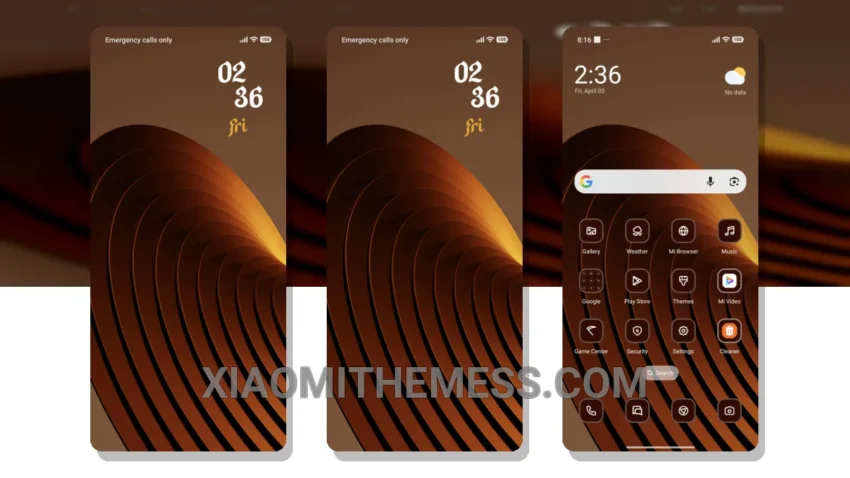
Dark mode just got a whole lot sleeker with the Brown Metal theme. This elegant theme is designed to give your Xiaomi device a unique metal twist, with a look that is both modern and sophisticated.
The Brown Metal theme is fully compatible with HyperOS, MIUI 12, MIUI 13, and MIUI 14, so you can enjoy a seamless and lag-free experience. One of the best things about this theme is its ability to enhance your device’s appearance without compromising on performance.
I love how the theme’s metal design sets it apart from other themes on the market. The customizable features are also a big plus, allowing you to personalize your device’s look and feel to suit your preferences. For instance, you can adjust the icon pack to match your style.
Some users may find the metal design a bit overwhelming at times, but overall, the Brown Metal theme remains a great choice for anyone looking to add a touch of elegance to their device. With its unique metal design and customizable features, it’s an excellent option for those who want to enhance their device’s appearance without compromising on performance.
In my testing, I found the Brown Metal theme to be a great all-around choice for anyone looking for a sleek and sophisticated theme. To be honest, I’m really impressed with how well it optimizes the dark mode experience, making it a great option for those who want to save battery life and reduce eye strain. The 120Hz smooth animations are also a nice touch, making the overall user experience feel seamless and lag-free.
Conclusion
Overall, the Brown Metal theme is a great choice for anyone looking to add a touch of elegance to their device. With its unique metal design, customizable features, and seamless performance, it’s an excellent option for those who want to enhance their device’s appearance without compromising on performance.
Theme Information
🛠️ How to Install This MTZ Theme
- Download the MTZ file to your device.
- Open the official Themes app and go to your profile.
- Import & Apply the downloaded file.