
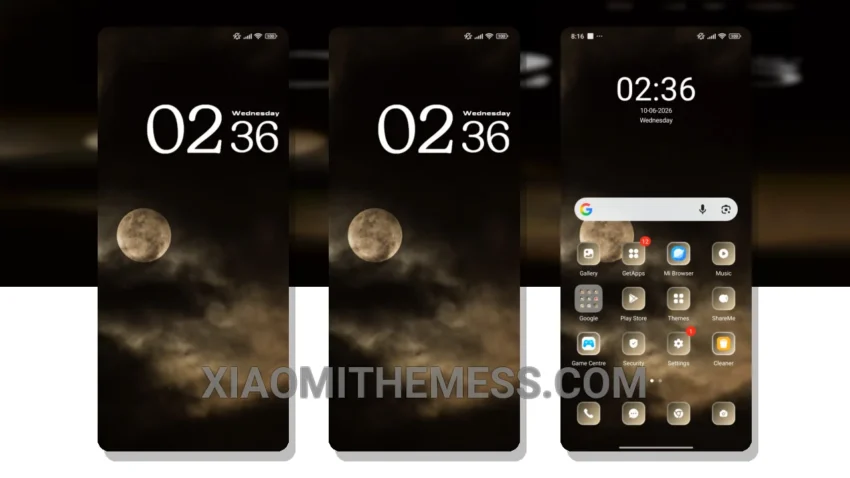
Dark Moon is the theme I’ve been waiting for. It’s a minimal vibrant take on the traditional dark mode theme. The moment I applied it, I knew I was in for a treat. The AMOLED pure black theme is stunning, with a unique retro twist that sets it apart from other themes.
The theme is fully compatible with HyperOS, MIUI 12, MIUI 13, and MIUI 14, so you don’t have to worry about compatibility issues. The size of the theme is 3.95 MB, which is relatively small compared to other themes.
One of the best things about Dark Moon is its ability to save battery life. The dark mode optimization for AMOLED screens is top-notch, and I’ve noticed a significant reduction in battery drain since I applied the theme. The theme also features clean interface and premium UI elements, making it a joy to use.
Overall, I’m really happy with the Dark Moon theme. The only caveat is that it may not be suitable for devices with low-resolution screens, as the theme’s design is optimized for high-resolution displays.
In my testing, I found the theme to be lag-free and smooth, with 120Hz smooth animations that make navigation a breeze. If you’re looking for a theme that combines style and functionality, Dark Moon is definitely worth checking out.
Theme Information
🛠️ How to Install This MTZ Theme
- Download the MTZ file to your device.
- Open the official Themes app and go to your profile.
- Import & Apply the downloaded file.