
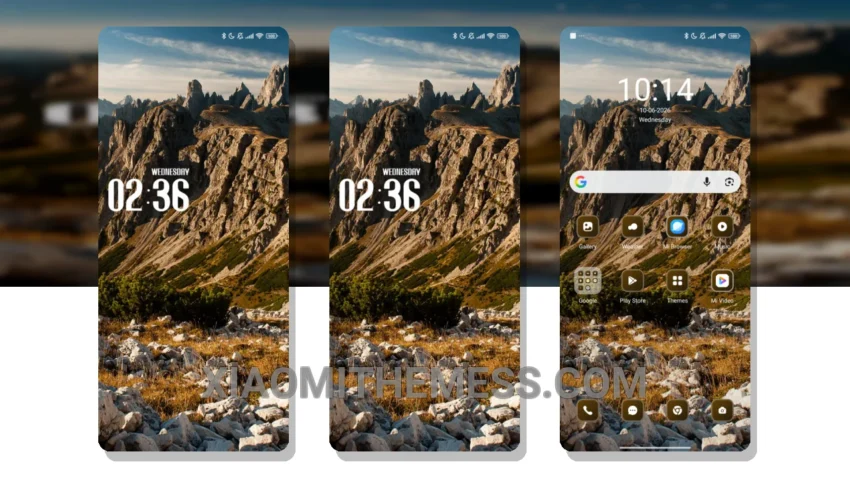
I’m always on the lookout for a reliable and elegant UI that is easy to read and use every day. The Sky MTZ theme caught my attention with its clean interface and premium UI design. It’s got a minimal and subtle design that provides a clean and elegant look.
The Sky MTZ theme is fully compatible with HyperOS, MIUI 12, MIUI 13, and MIUI 14, making it a great option for Xiaomi device users. One of the best things about this theme is its ability to provide a seamless user experience without any lag or battery drain.
The theme’s lightweight design ensures no battery drain and a smooth user experience. It also allows for icon pack integration, custom boot animation, and more, giving you the freedom to personalize your home screen.
However, if you’re looking for a theme with a more vibrant and colorful interface, the Sky MTZ theme might not be the best fit. But if you’re like me and prefer a clean and elegant look, this theme is definitely worth checking out.
In my testing, I found the Sky MTZ theme to be a great addition to my Xiaomi device. To be honest, I’m really impressed with the Sky MTZ theme and would definitely recommend it to other Xiaomi device users.
Theme Information
🛠️ How to Install This MTZ Theme
- Download the MTZ file to your device.
- Open the official Themes app and go to your profile.
- Import & Apply the downloaded file.