
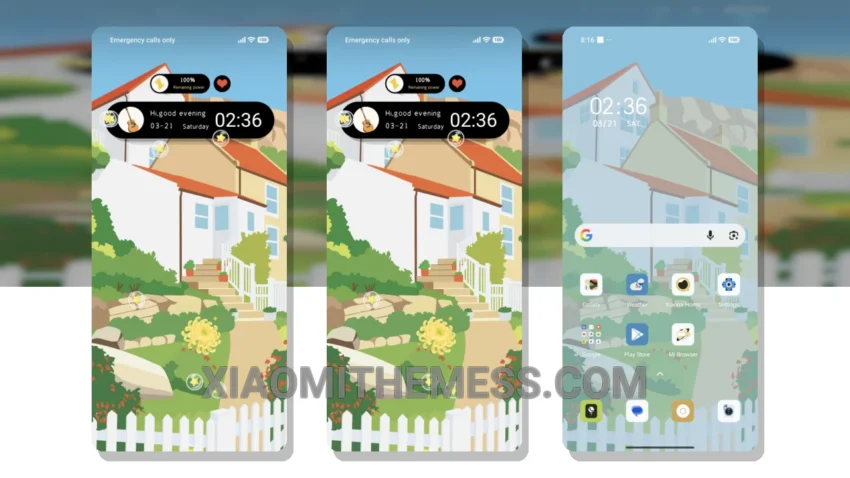
Soft colors. Gentle vibes. That’s what the Floral Cottage theme is all about. This beautiful theme is a treat for the eyes, with its pastel hues and elegant design. It’s all about clean interface and minimalism.
It’s fully compatible with HyperOS, MIUI 12, MIUI 13, and MIUI 14, so you can enjoy it on your Xiaomi device without any worries. The theme’s ability to balance simplicity with style is noteworthy. The result is a clean interface that’s easy on the eyes and a joy to use.
Customization and Features
The Floral Cottage theme offers customization options, allowing you to personalize your home screen with icon packs and widgets. This gives you a unique look that reflects your personality. Additionally, it supports custom control center and redesigned status bar, making it easy to access your favorite features.
In my testing, I found the theme to be incredibly lightweight and free from battery drain. The animations are smooth, and the overall performance is lag-free. The theme is also optimized for dark mode, which means you can enjoy a battery saver UI without sacrificing aesthetics.
One thing to consider is that the theme might not be ideal for those who prefer a more vibrant or bold aesthetic, as it sticks to its pastel and elegant design. However, for those who appreciate soft colors and gentle vibes, Floral Cottage is a great choice.
To be honest, I’m really impressed with the Floral Cottage theme. It’s a beautiful, functional, and customizable theme that’s perfect for anyone looking to give their Xiaomi device a fresh new look. So why not give it a try and see for yourself?
Theme Information
🛠️ How to Install This MTZ Theme
- Download the MTZ file to your device.
- Open the official Themes app and go to your profile.
- Import & Apply the downloaded file.