
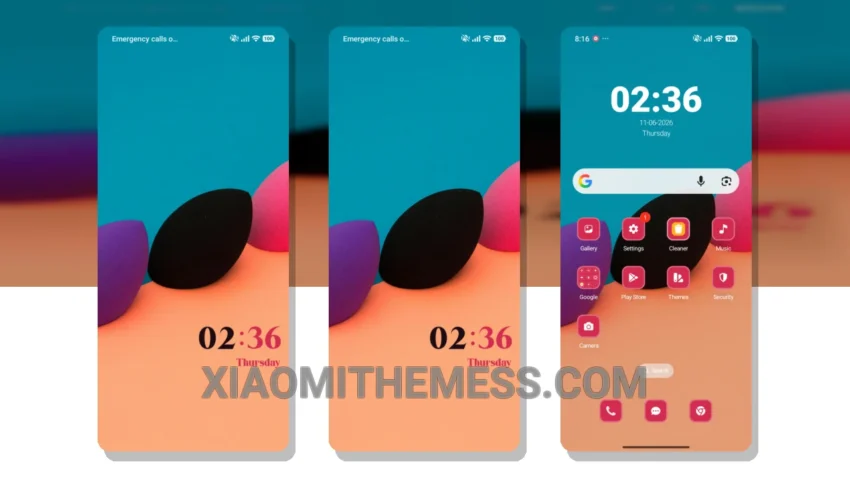
Darkness falls, and with it, the Beauty Blender theme takes over, bringing a game-changing minimalistic look to Xiaomi devices. This theme is all about embracing the elegance of dark mode optimization, giving your phone a sleek, premium feel. It’s not just about aesthetics; the Beauty Blender theme is designed to save battery life, ensuring a lag-free experience without compromising on style.
The theme offers a range of customization options, including icon pack integration and a custom control center, allowing you to personalize your device to your heart’s content. Advanced widgets and interactive lockscreen widgets are also part of the package, making your device truly unique. With its compatibility with HyperOS, MIUI 12, MIUI 13, and MIUI 14, you can be sure it will work seamlessly on your Xiaomi phone.
Customization and Performance
One of the standout features of the Beauty Blender theme is its ability to provide a clean interface and an aesthetic home screen, making it a joy to use. The minimal vibrant design ensures that your device looks modern and sophisticated. While it may not be suitable for those who prefer bright, vibrant colors, for those who love the elegance of dark interfaces, this theme is a must-have. The only potential caveat is that it might not appeal to fans of brighter themes, but for those who enjoy simplicity and style, it’s a winner.
In my testing, I found the Beauty Blender theme to be a reliable and elegant solution for daily use. The customization options and minimal design make it a great choice for those looking to personalize their device without compromising on performance. To be honest, I’ve never been a fan of bright themes, and this one has won me over with its simplicity and style.
The Beauty Blender theme is a testament to the power of dark mode optimization and minimalistic design, providing a unique and sleek look that sets it apart from other themes. With its focus on battery-saving features and lag-free performance, it’s an excellent choice for anyone looking to elevate their Xiaomi device’s look and feel.
Theme Information
🛠️ How to Install This MTZ Theme
- Download the MTZ file to your device.
- Open the official Themes app and go to your profile.
- Import & Apply the downloaded file.