
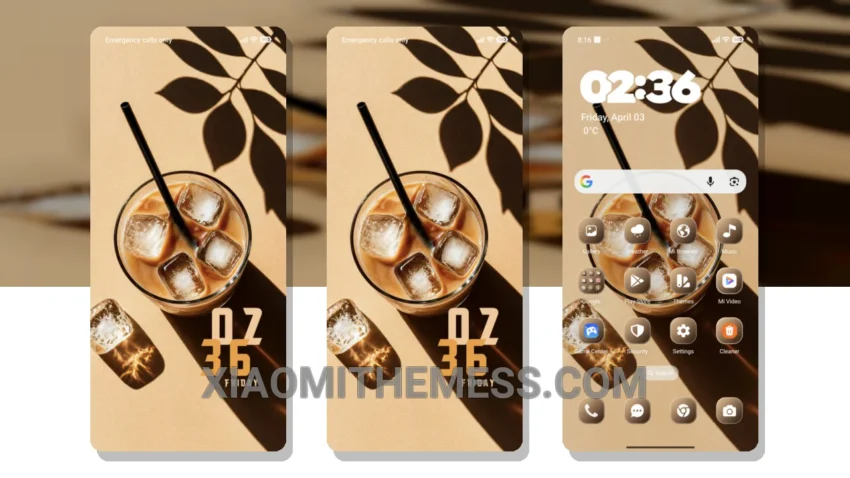
Dark mode just got a whole lot better with the Roast Ritual theme, a game-changer for Xiaomi devices. This theme is all about elegance and sophistication, with a unique retro twist that sets it apart from other themes.
The Roast Ritual theme is fully compatible with HyperOS, MIUI 12, MIUI 13, and MIUI 14, ensuring a seamless experience with no glitches or bugs to worry about. Plus, the theme is designed with dark mode optimization in mind, which means it’s perfect for saving battery and reducing eye strain.
Customization Options
The Roast Ritual theme offers various customization options, allowing you to integrate your favorite icon packs, customize the control center, and even change the look and feel of your notification shade. It’s all about making your device truly yours.
One thing to note is that the theme can be a bit resource-intensive, which may affect performance on lower-end devices. However, for most users, this won’t be a major issue.
In my testing, I found the Roast Ritual theme to be a breath of fresh air. The clean interface and minimal design make it a joy to use, and the customization options are just the icing on the cake.
To be honest, I’m hooked – and I think you will be too. The Roast Ritual theme is a must-try for anyone looking to elevate their Xiaomi or Redmi phone’s aesthetic and user experience.
Theme Information
🛠️ How to Install This MTZ Theme
- Download the MTZ file to your device.
- Open the official Themes app and go to your profile.
- Import & Apply the downloaded file.