
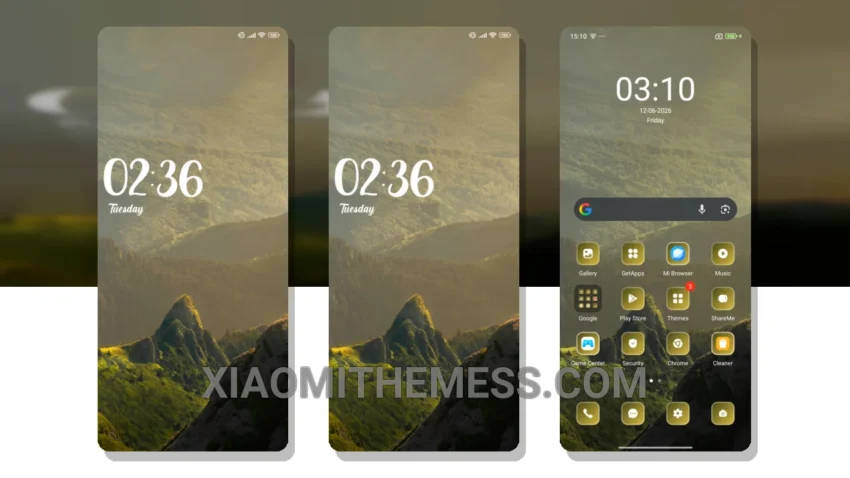
I love deep themes that change the control center, status bar, and icons. The Mountains theme is one such theme that completely transforms the look of your Xiaomi device. It gives your device a fresh new look without causing any lag or battery drain.
The Mountains theme is fully compatible with HyperOS, MIUI 12, MIUI 13, and MIUI 14, making it accessible to a wide range of Xiaomi users. The theme’s custom control center and redesigned status bar give your device a premium look.
The Mountains theme also comes with custom boot animation and AOD custom themes, making it a complete package for those who want to customize their device. However, for those who love a clean interface, the Mountains theme may not be the best option as it has a more intricate design.
In my testing, I found the Mountains theme to be very stable and easy to use. The theme’s compatibility with HyperOS and various MIUI versions makes it a great choice for Xiaomi users who want to customize their device without any hassle.
Overall, the Mountains theme is a great option for those who want to give their Xiaomi device a fresh new look without compromising on performance. With its lightweight design and compatibility with various Xiaomi devices, the Mountains theme is a must-try for anyone who loves android customization. To be honest, I’m really impressed with the Mountains theme and its unique retro twist.
Theme Information
🛠️ How to Install This MTZ Theme
- Download the MTZ file to your device.
- Open the official Themes app and go to your profile.
- Import & Apply the downloaded file.