
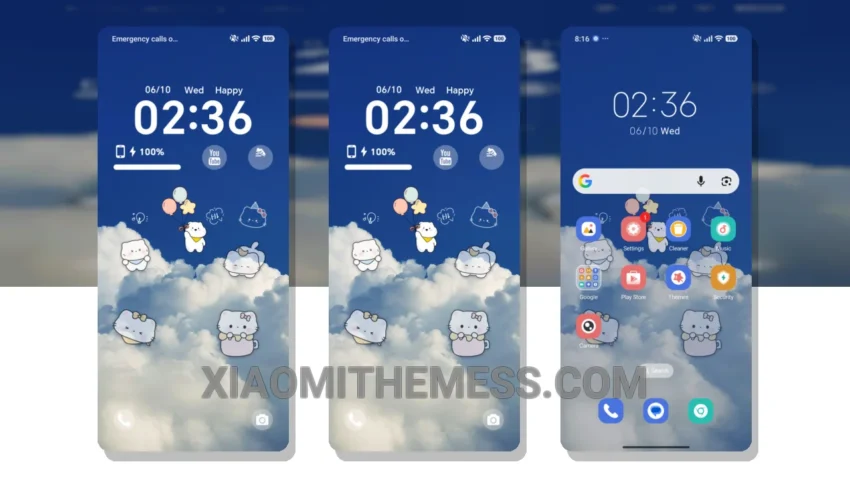
Love at first sight! The Cloud Play Kitty theme is a must-have for anyone looking to give their Xiaomi device a fresh new look. It’s fully compatible with HyperOS, MIUI 12, MIUI 13, and MIUI 14, so you can enjoy a seamless experience.
This theme is all about the details. The cute retro twist it brings to your device is undeniable. The custom control center, redesigned status bar, and interactive lockscreen widgets all come together to create a unique and engaging user experience.
The Cloud Play Kitty theme is also a great option for those who want a smooth and efficient experience. Its lightweight design and dark mode optimization make it a battery saver UI that won’t drain your battery. Plus, with its 120Hz smooth animations and system optimization, you can enjoy a lag-free experience all day long.
Customization Options
The Cloud Play Kitty theme offers a range of customization options, including custom control center, redesigned status bar, and interactive lockscreen widgets. You can also customize the look and feel of your device with the theme’s unique icon pack and wallpaper options.
One thing to note is that the Cloud Play Kitty theme may not be suitable for everyone, especially those who prefer a more minimalistic design. However, if you’re looking for a fun and playful theme that will add some personality to your device, this is definitely worth checking out.
In my testing, I was impressed by how well the Cloud Play Kitty theme performed. The custom boot animation was a nice touch, and the overall experience was seamless. To be honest, I’m really impressed with the Cloud Play Kitty theme. It’s a great option for anyone looking to add some personality to their Xiaomi device, and its battery saver UI and dark mode optimization make it a great choice for those who want a smooth and efficient experience.
Theme Information
🛠️ How to Install This MTZ Theme
- Download the MTZ file to your device.
- Open the official Themes app and go to your profile.
- Import & Apply the downloaded file.