
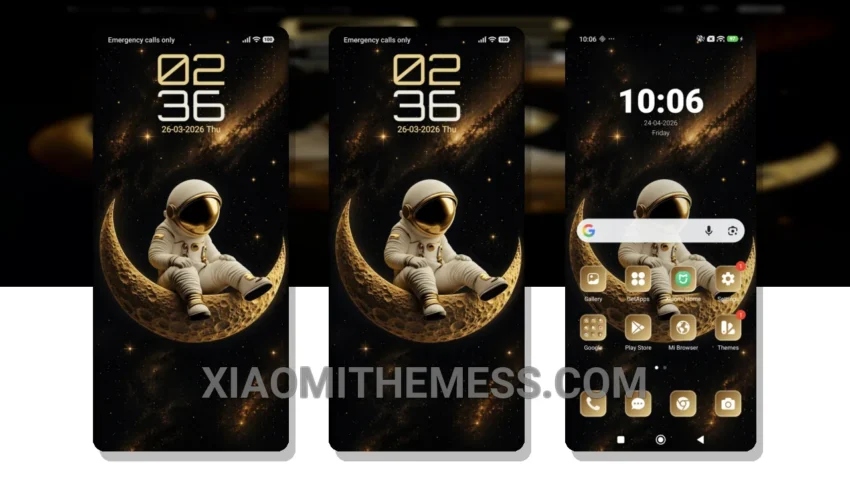
Get ready to transform your Xiaomi or Redmi device with the stunning Moon Watcher theme. This theme is fully compatible with HyperOS, MIUI 12, MIUI 13, and MIUI 14, ensuring a seamless and lag-free experience.
What really stands out is the theme’s ability to provide a dark mode optimization, which not only looks great but also helps to save battery life. The overall design is elegant and professional, making it perfect for daily use.
Smooth Performance and Customization Options
One of the highlights of this theme is its ability to provide a smooth and lag-free experience, thanks to its lightweight design and optimization for 120Hz displays. Additionally, the theme offers a range of customizable options, allowing you to personalize your home screen and lock screen to your liking.
However, one caveat is that the theme may not be suitable for devices with lower specifications, as it may cause some performance issues. Nevertheless, for most users, the Moon Watcher theme is an excellent choice for those looking to give their device a fresh new look.
Conclusion
In my testing, I found the Moon Watcher theme to be a great option for those who want a reliable and easy-to-use interface. The theme’s clean and minimal design makes it easy to navigate and find what you need, and the customizable options allow you to make it your own.
To be honest, I’m really impressed with the Moon Watcher theme, and I think it’s a great choice for anyone looking to customize their Xiaomi or Redmi device. With its range of features, including a clean interface, customizable options, and dark mode optimization, it’s an excellent option for those who want a reliable and elegant theme.
Theme Information
🛠️ How to Install This MTZ Theme
- Download the MTZ file to your device.
- Open the official Themes app and go to your profile.
- Import & Apply the downloaded file.