
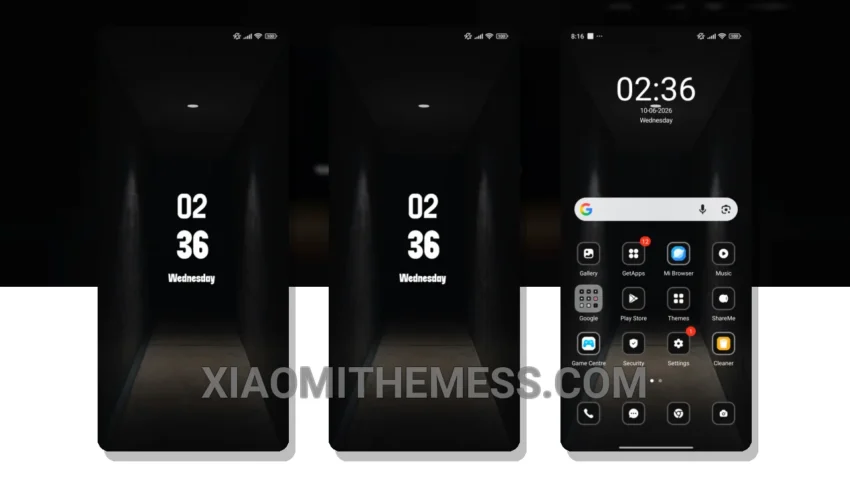
Flash the Sad theme and get ready to experience a whole new level of android customization. This theme is a game-changer for Xiaomi users, offering a sleek and modern design that’s hard to resist.
The theme’s attention to detail is impressive, from the custom control center to the redesigned status bar. It’s clear that the developer has put a lot of thought into creating a unique and user-friendly experience.
Key Features
Tinkering with themes can be a fun and creative process, and the Sad theme is no exception. With its minimal vibrant aesthetic, you’ll get a premium feel. Plus, the theme is compatible with HyperOS, MIUI 12, MIUI 13, and MIUI 14, so you can enjoy it on a range of devices.
The Sad theme’s dark mode optimization helps to reduce battery drain, making it a great choice for those who want to conserve their battery life. Additionally, the theme provides a lag-free experience, which makes it perfect for daily use.
However, one thing to note is that the theme may not be suitable for everyone, particularly those who prefer a more traditional UI. But for those who are looking for a fresh and modern look, the Sad theme is definitely worth checking out.
In my testing, I found the Sad theme to be incredibly stable and easy to use. The custom boot animation is a nice touch, and the theme’s overall design is both sleek and sophisticated. If you’re looking to give your Xiaomi a makeover, I highly recommend giving the Sad theme a try.
To get the most out of your Xiaomi device, consider pairing the Sad theme with other android customization apps, such as icon packs or launchers, to create a unique and personalized look.
Theme Information
🛠️ How to Install This MTZ Theme
- Download the MTZ file to your device.
- Open the official Themes app and go to your profile.
- Import & Apply the downloaded file.