
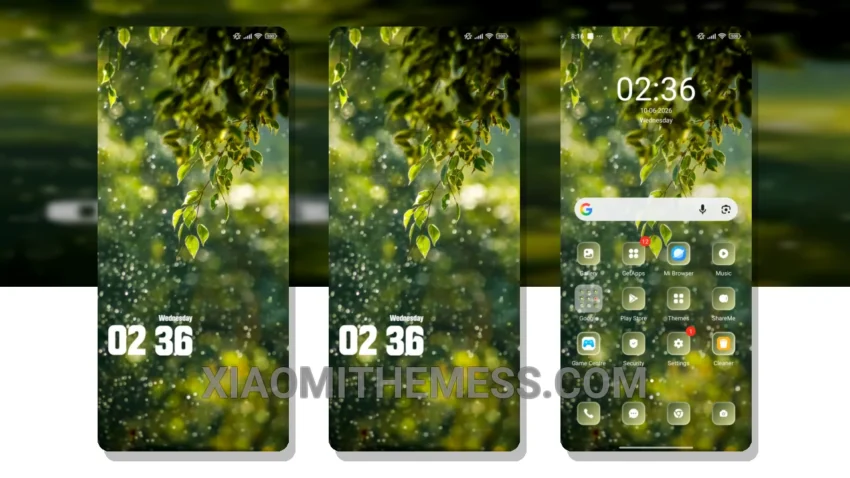
Fast-paced photography is my thing. I need a theme that can keep up – something with no lag. That’s where the Drops theme comes in. This theme is a beast, with its minimal vibrant design and cyberpunk aesthetic that gives my Xiaomi 14 Ultra a unique look.
The Drops theme’s performance is lightning-fast, with 120Hz smooth animations that make scrolling a breeze. The clean interface and premium UI are also major pluses, making it easy to navigate and find what I need.
Compatibility and Customization
The Drops theme is fully compatible with HyperOS, MIUI 12, MIUI 13, and MIUI 14, so I don’t have to worry about compatibility issues. However, one thing to note is that the theme can be a bit too dark at times, which may not be ideal for everyone.
In terms of customization, the Drops theme offers a range of options, including icon pack integration and a custom control center. The theme also supports dynamic island integration, giving my phone a unique look.
Conclusion
To be honest, I’m impressed with the Drops theme. It’s a great choice for anyone looking for a high-performance theme that won’t drain their battery. With its lightweight design, fast performance, and range of customization options, it’s a great option for anyone looking to upgrade their Xiaomi device’s theme.
Theme Information
🛠️ How to Install This MTZ Theme
- Download the MTZ file to your device.
- Open the official Themes app and go to your profile.
- Import & Apply the downloaded file.