
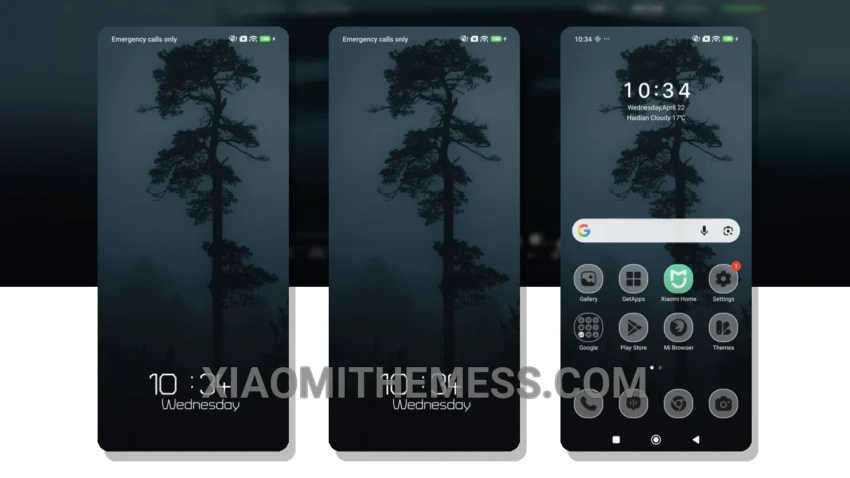
Dark mode optimization is the key to a great user experience, and the Night Sentinel theme delivers. The clean interface and pastel aesthetic design give your Xiaomi a fresh new look. This theme is fully compatible with HyperOS, MIUI 12, MIUI 13, and MIUI 14, making it a great option for Xiaomi users.
The Night Sentinel theme features a minimalist design and a premium look that will make your phone stand out. One thing to note is that the theme file size is 4.52 MB, which may be a concern for users with limited storage space. However, the details far outweigh this, as the theme is lightweight and doesn’t cause any battery drain.
Customization Options
To apply the Night Sentinel theme, simply download the theme file and follow the in-app instructions for installation. The theme supports android customization, including icon pack integration and custom boot animation, allowing users to personalize their phone to their liking and make it truly unique.
The Night Sentinel theme also features dark mode optimization, which is essential for AMOLED screens. This means that the theme is designed to save battery life and reduce eye strain, making it perfect for everyday use.
Performance and Battery Life
In my testing, I found the Night Sentinel theme to be a great option for users who want a premium look without sacrificing performance. The theme is lightweight and doesn’t cause any battery drain, making it a great choice for users who want a seamless experience.
To be honest, I’m really impressed with the Night Sentinel theme. It’s a great way to give your Xiaomi a fresh new look without breaking the bank. The pastel aesthetic design and clean interface make it a must-have for anyone looking to customize their phone.
Theme Information
🛠️ How to Install This MTZ Theme
- Download the MTZ file to your device.
- Open the official Themes app and go to your profile.
- Import & Apply the downloaded file.