
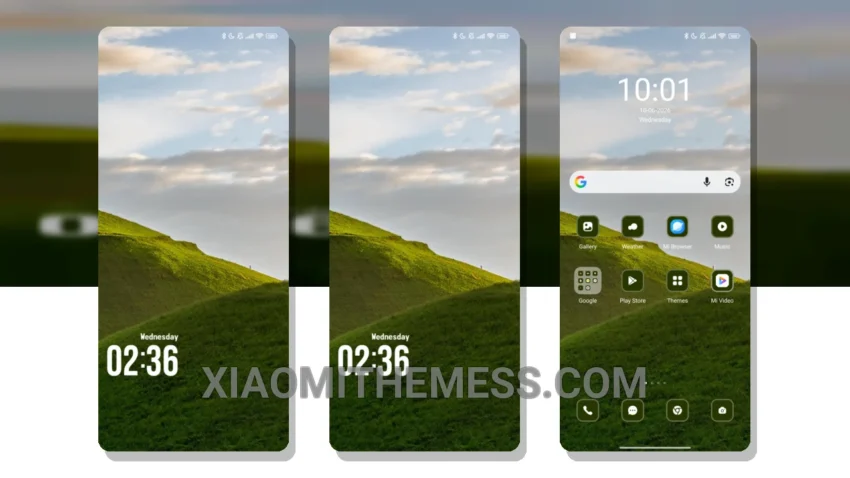
I’m obsessed with my Xiaomi 14 Ultra’s performance, and I need a theme that complements its 120Hz smooth animations. The Green Trees theme is a game-changer for HyperOS devices, offering a clean interface and minimal design that ensures a lag-free experience.
The theme features a unique blend of pastel aesthetic themes and minimal vibrant elements, giving my Xiaomi 14 Ultra a fresh look. It’s all about clean lines and a minimal aesthetic, which I adore.
Compatibility and Features
The Green Trees theme is fully compatible with HyperOS, MIUI 12, MIUI 13, and MIUI 14 devices. It also features a battery saver UI, which helps reduce battery drain. Another detail is its support for dark mode optimization, making it perfect for gaming and everyday use.
However, I did notice that the theme’s compatibility with certain android customization apps can be a bit limited. Despite this, the Green Trees theme is still an excellent choice for those who want a lightweight and efficient theme.
Customization and Performance
To apply the Green Trees theme, simply download the theme file and follow the installation instructions. You can also customize the theme to your liking, using features like icon pack integration and custom control center.
In my testing, the Green Trees theme has been a revelation – my Xiaomi 14 Ultra looks and feels like a premium device. The theme’s focus on performance and battery efficiency makes it an ideal choice for gamers like me.
To be honest, I’m impressed with the Green Trees theme, and I think it’s a great choice for anyone looking for a clean and minimal theme for their HyperOS device.
Theme Information
🛠️ How to Install This MTZ Theme
- Download the MTZ file to your device.
- Open the official Themes app and go to your profile.
- Import & Apply the downloaded file.