
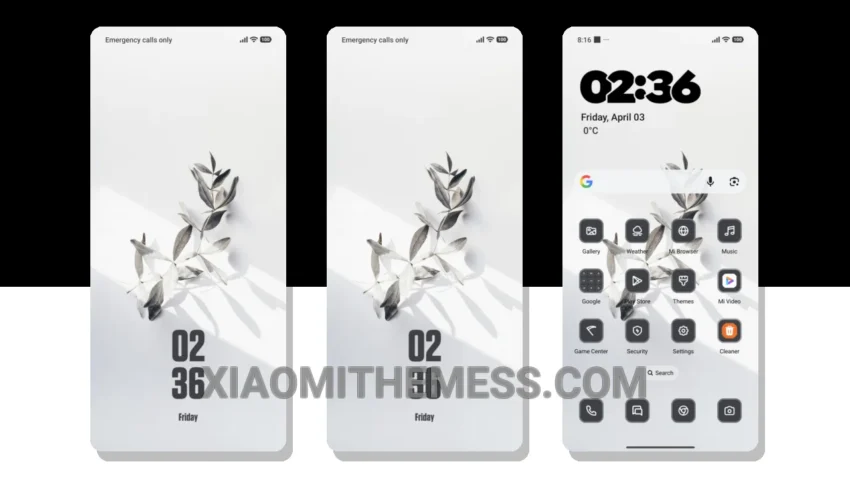
Transform your Xiaomi into a stunning device with the Metal Leaves theme. This theme is a game-changer, offering a premium look and feel that will make you fall in love with your device all over again.
The theme’s clean interface and aesthetic home screen are standout features, complete with custom control center and redesigned status bar. You’ll also enjoy advanced widgets and interactive lockscreen widgets for a truly personalized experience.
Customization and Compatibility
Metal Leaves theme is fully compatible with HyperOS, MIUI 12, MIUI 13, and MIUI 14, making it a great choice for Xiaomi and Redmi devices. The theme also features Material You dynamic theming, allowing you to customize the theme to your heart’s content.
One of the best things about this theme is its support for dynamic island integration, providing a seamless and interactive experience. Plus, the theme is designed to be a battery saver UI, with dark mode optimization and 120Hz smooth animations for a lag-free experience.
However, it’s worth noting that the theme file is quite large, at 4.09 MB, so make sure you have enough storage space before downloading. But trust me, it’s worth it! The Metal Leaves theme is a must-have for anyone looking to give their Xiaomi a premium makeover.
In my testing, I was blown away by the theme’s attention to detail and its ability to provide a truly premium experience. To be honest, I’m obsessed with the Metal Leaves theme, and I think you will be too. So what are you waiting for? Download the theme today and experience the ultimate in android customization!
The Metal Leaves theme offers several details, including a unique and elegant design, a highly customizable interface, and a seamless user experience. Overall, the Metal Leaves theme is an excellent choice for anyone looking to elevate their Xiaomi device’s look and feel.
Theme Information
🛠️ How to Install This MTZ Theme
- Download the MTZ file to your device.
- Open the official Themes app and go to your profile.
- Import & Apply the downloaded file.