
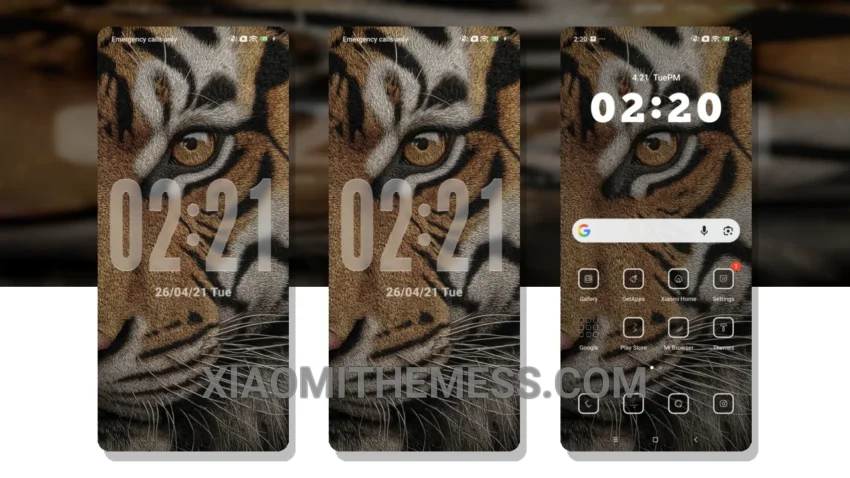
I’m always on the lookout for a theme that gives my Xiaomi device a unique look. That’s why I was excited to try out the Tiger theme. The theme’s minimalist design gives my device a clean and sleek look.
Tinkering with the theme’s settings, I found that it’s highly customizable. I can change the icons, wallpapers, and even the boot animation. The theme also comes with a custom control center that allows me to easily access my device’s settings.
Performance and Battery Life
The Tiger theme is optimized for performance, which means that my device runs smoothly and quickly. The theme’s battery saver UI is also a big plus, helping to extend my device’s battery life. However, one thing to note is that the theme may not be compatible with all devices.
The Tiger theme is a great example of how android customization can elevate the look and feel of a device. In my testing, I found that the theme’s dark mode optimization is excellent, and the 120Hz smooth animations make for a seamless user experience.
To be honest, I’m loving the Tiger theme on my Xiaomi device. The clean interface and custom boot animation are just a few of the features that make this theme stand out. If you’re looking for a new theme to try out, I’d definitely suggest giving the Tiger theme a shot.
The Tiger theme is fully compatible with HyperOS, MIUI 12, MIUI 13, and MIUI 14, making it a great option for Xiaomi and Redmi phone users. With its lag-free experience and battery saver UI, this theme is definitely worth checking out.
Overall, the Tiger HyperOS theme is a great choice for those who want a minimalist and customizable theme for their Xiaomi device. Its clean interface and customizable options make it a standout theme in the HyperOS theme store.
Theme Information
🛠️ How to Install This MTZ Theme
- Download the MTZ file to your device.
- Open the official Themes app and go to your profile.
- Import & Apply the downloaded file.