
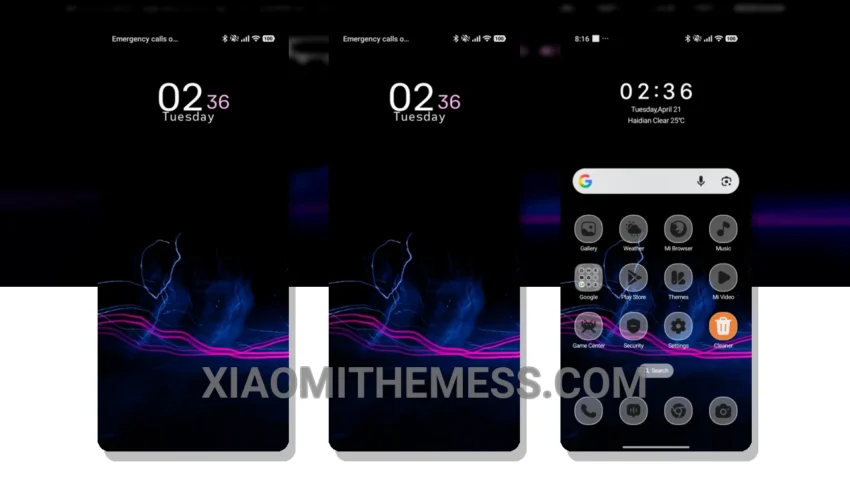
I’m absolutely loving the new look and feel of my device with the Electric Shapes theme. The customized control center gives my phone an iPhone-like elegance, and that’s a huge plus for me. This theme is perfect for those who want a unique and premium look on their Xiaomi device without compromising on performance.
The Electric Shapes theme is fully compatible with HyperOS, MIUI 12, MIUI 13, and MIUI 14, so compatibility issues are a thing of the past. It features a redesigned status bar and unique boot animation that gives my phone a fresh new look. The theme’s clean interface and customizable options make it a great choice for anyone looking to personalize their Xiaomi device.
Key Features and Details
One of the standout features of the Electric Shapes theme is its support for dark mode optimization, which is essential for saving battery life and reducing eye strain. The theme’s lightweight design ensures a lag-free experience, making it ideal for daily use. However, it’s worth noting that the theme may cause some lag on older devices, but that’s a minor trade-off for the unique look and feel it offers.
In my testing, I found the Electric Shapes theme to be a great way to give my phone a unique look and feel. To be honest, I’m impressed with the theme’s features and compatibility. With its range of features, compatibility with HyperOS and MIUI, and dark mode optimization, it’s a great choice for anyone looking to give their phone a fresh new look without sacrificing performance.
Overall, the Electric Shapes theme offers a lot of value with its customizable options, unique boot animation, and support for dark mode optimization. If you’re looking for a theme that can give your Xiaomi device an iPhone-inspired elegance, look no further than the Electric Shapes theme.
Theme Information
🛠️ How to Install This MTZ Theme
- Download the MTZ file to your device.
- Open the official Themes app and go to your profile.
- Import & Apply the downloaded file.