
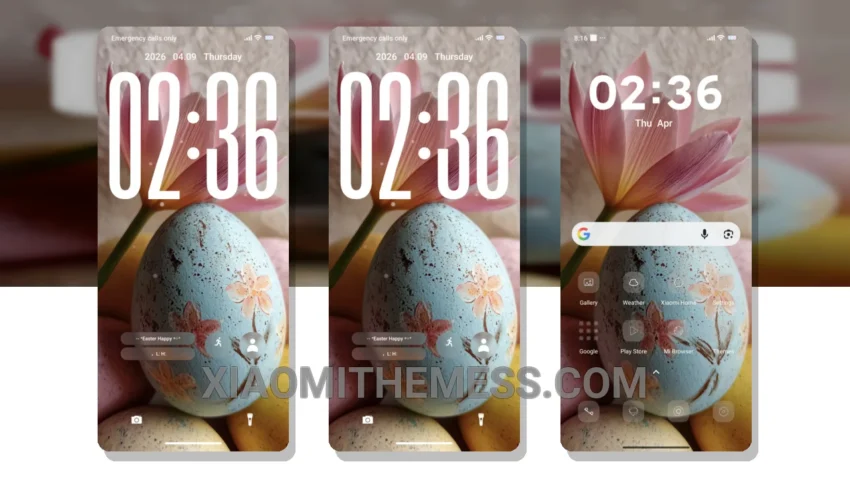
Soft hues and clean lines – that’s what the Easter Egg theme is all about. It brings a unique pastel aesthetic to your Xiaomi device, perfect for those who want a clean and vibrant interface. I love how it changes the default look!
One cool thing about this theme is its compatibility – it works seamlessly with HyperOS, MIUI 12, MIUI 13, and MIUI 14. The theme is also lightweight, which means it won’t slow down your device or drain your battery.
Customization and Performance
The theme is designed to provide a lag-free experience with 120Hz smooth animations, making it a great choice for those looking for a battery-efficient theme. With its pastel aesthetic themes, it’s perfect for users who want a minimal yet eye-catching design. The customization options are also a big plus.
In my testing, I found the Easter Egg theme to be a great addition to my Xiaomi device. The theme is easy to apply and customize, and it provides a unique and refreshing look to the interface. To be honest, I’m impressed with the attention to detail and the overall design of the theme.
Overall, the Easter Egg theme is a great choice for Xiaomi users who want a unique and customizable theme with a pastel aesthetic. With its lightweight design, battery efficiency, and customization options, it’s a great addition to any device. Give it a try and experience the difference for yourself!
Theme Information
🛠️ How to Install This MTZ Theme
- Download the MTZ file to your device.
- Open the official Themes app and go to your profile.
- Import & Apply the downloaded file.