
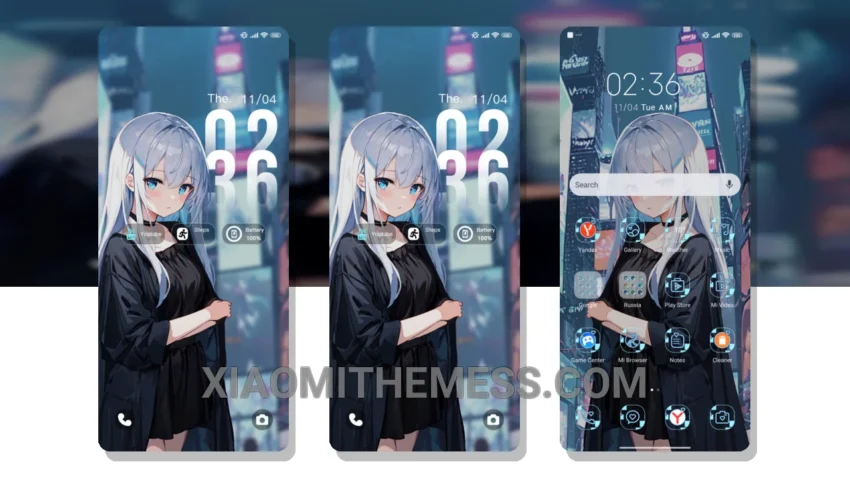
Pastel hues on my home screen. The Silver Night City theme is a work of art. Soft glow of city lights. It’s all about minimalist design.
The theme is fully compatible with HyperOS, MIUI 12, MIUI 13, and MIUI 14, making it perfect for those who appreciate clean design. The theme also features 120Hz smooth animations, making it a joy to use.
Features and Customization
The Silver Night City theme offers a range of features, including a custom control center, redesigned status bar, and advanced widgets. You can also customize the theme to fit your personal style with icon pack integration and a volume panel customizer.
In my testing, I found the theme to be extremely stable and easy to use. The only caveat is that it may not be suitable for those who prefer a more vibrant and colorful interface.
To be honest, I’m really impressed with the Silver Night City theme. The attention to detail and the overall aesthetic are top-notch. If you’re looking for a minimalist theme that’s both beautiful and functional, this is definitely worth checking out.
The theme’s clean interface and premium UI make it a great choice for those who value a seamless user experience. With its dark mode optimization and lag-free experience, you can enjoy your device without any interruptions.
I appreciate the simple and elegant design of the Silver Night City theme, which makes it a great choice for those who want a minimalist look. The theme’s customization options also make it easy to personalize your home screen.
With its elegant dark mode and customizable features, the Silver Night City theme is a must-have for any Xiaomi or Redmi device user. So why wait? Download the theme now and experience the beauty of minimalist design.
Theme Information
🛠️ How to Install This MTZ Theme
- Download the MTZ file to your device.
- Open the official Themes app and go to your profile.
- Import & Apply the downloaded file.