
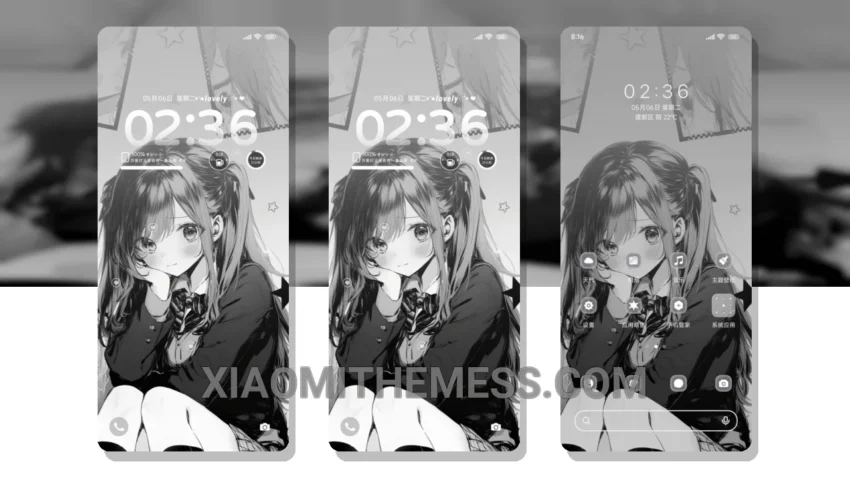
Big fan of deep, rich themes? Get ready to fall in love with the Romantic Gray Memories theme! This stunning theme is fully compatible with HyperOS, MIUI 12, MIUI 13, and MIUI 14, so you can enjoy it on your Xiaomi or Redmi device.
It’s all about the little things. Custom boot animation, anyone? The Romantic Gray Memories theme has got you covered. Plus, with custom icon packs and interactive lockscreen widgets, you’ll feel like you’re getting a brand new phone.
One thing that really stands out – in a good way – is how well this theme balances aesthetics and performance. You won’t experience any lag or battery drain, thanks to the theme’s lightweight design and system optimization.
Of course, no theme is perfect. One potential caveat is that the theme’s pastel aesthetic might not be to everyone’s taste. But hey, if you’re looking for a unique, eye-catching theme, the Romantic Gray Memories theme is definitely worth checking out.
In my testing, I was really impressed with how seamlessly the theme integrated with my device. The custom control center and redesigned status bar are particularly nice touches. To be honest, I’m loving the Romantic Gray Memories theme, and I think you will too!
Theme Information
🛠️ How to Install This MTZ Theme
- Download the MTZ file to your device.
- Open the official Themes app and go to your profile.
- Import & Apply the downloaded file.