
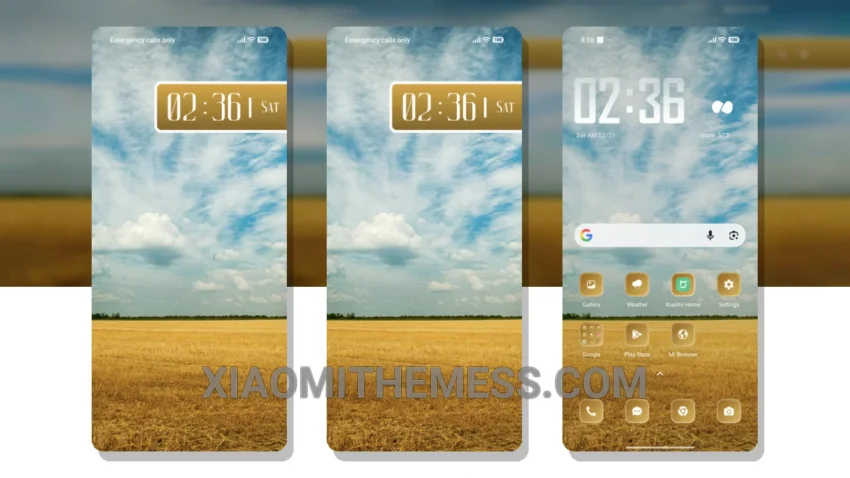
I’m loving the new Grass Field theme! It’s a great Xiaomi theme that gives my device a serene pastel aesthetic. The theme is fully compatible with HyperOS, MIUI 12, MIUI 13, and MIUI 14, so you don’t have to worry about compatibility issues.
The Grass Field theme is all about minimalism and giving your device a clean interface. The pastel colors used in the theme are soothing to the eyes and give your device a unique look. The theme also supports dark mode optimization, which helps in saving battery life and provides a better viewing experience.
One of the best things about the Grass Field theme is that it allows you to customize the control center and status bar. You can personalize your device to give it a unique look that suits your style. The theme also supports custom boot animation and AOD custom themes, which adds to the overall aesthetic of your device.
The Grass Field theme is a great option for those who want a lightweight theme that doesn’t drain their battery. The theme is designed to provide a lag-free experience and supports 120Hz smooth animations. However, some users may find the theme a bit too simple, which could be a caveat for those who prefer more complex themes.
In my testing, I found the Grass Field theme to be a great option for those who want a clean and minimalistic theme. The theme is easy to apply, and the customization options are plenty. To be honest, I’m really impressed with the Grass Field theme, and I think it’s a great choice for anyone looking for a serene pastel aesthetic theme for their Xiaomi device.
Conclusion
Overall, the Grass Field theme is a great option for those who want a minimalistic and clean theme for their Xiaomi device. The theme is fully compatible with HyperOS, MIUI 12, MIUI 13, and MIUI 14, and it supports dark mode optimization, custom control center, and status bar customization. If you’re looking for a lightweight theme that provides a lag-free experience, the Grass Field theme is definitely worth checking out.
Theme Information
🛠️ How to Install This MTZ Theme
- Download the MTZ file to your device.
- Open the official Themes app and go to your profile.
- Import & Apply the downloaded file.