
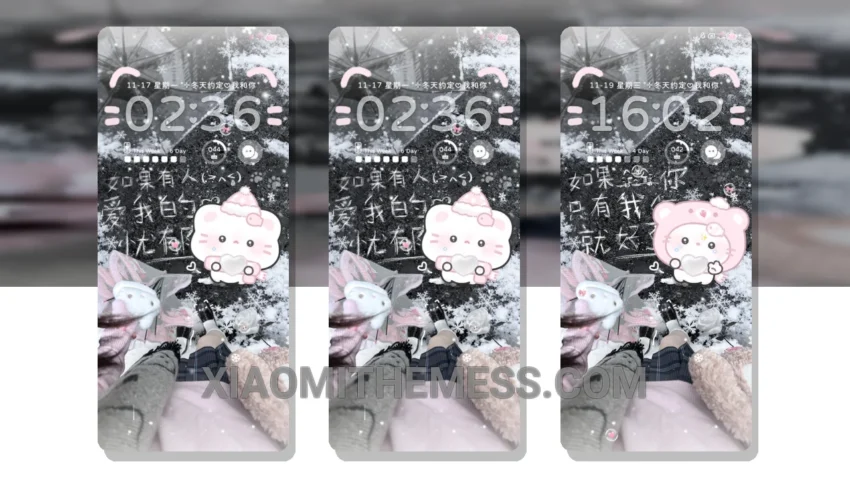
Looking for a theme that’s both elegant and easy to use? The Snowy Kitten theme is a great choice. With its beautiful pastel aesthetic and minimal design, it’s perfect for those who want a clean and simple look.
The theme is fully compatible with HyperOS, MIUI 12, MIUI 13, and MIUI 14, making it accessible to a wide range of users. One of the standout features of the Snowy Kitten theme is its pastel color scheme, which gives it a unique and eye-catching look.
In terms of performance, the Snowy Kitten theme is lightweight and doesn’t drain the battery. It also has dark mode optimization, which provides a seamless and battery-friendly experience. Additionally, the theme supports 120Hz smooth animations, resulting in a lag-free experience.
However, one thing to note is that the theme may not be suitable for those who prefer a more vibrant and bold look. The minimal design, while elegant, may be too understated for some users.
Customization Options
The Snowy Kitten theme supports icon pack integration, advanced widgets, and interactive lockscreen widgets, making it a great choice for those who want a more personalized experience.
In my testing, I found that the theme works seamlessly with android customization apps, and the icon pack integration is a nice touch. The theme also supports custom boot animation and AOD custom themes, making it a great choice for those who want a more unique look.
To be honest, I’ve been using this theme for a while now, and I’m really impressed with its performance and aesthetic. The clean interface and customizable options make it a joy to use, and I would definitely recommend it to anyone looking for a new theme.
Theme Information
🛠️ How to Install This MTZ Theme
- Download the MTZ file to your device.
- Open the official Themes app and go to your profile.
- Import & Apply the downloaded file.