
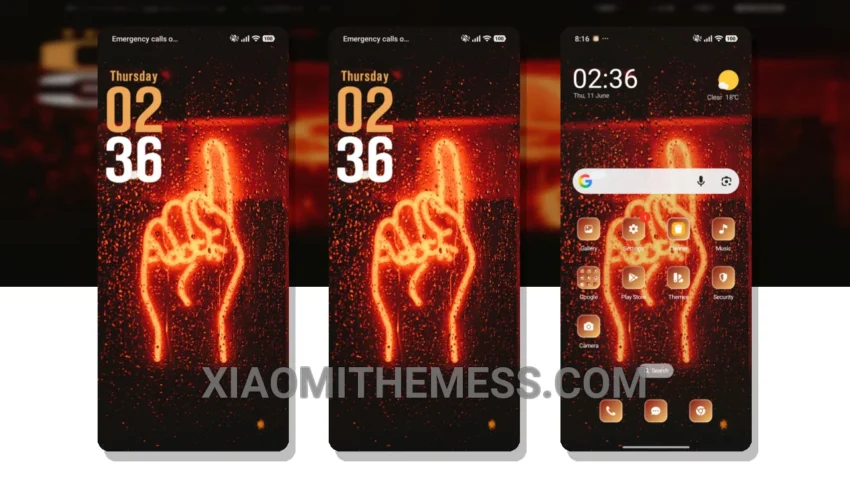
I love clean lines and pastel colors. The Neon Light theme is a great example of this, with its simple and elegant design. It’s a must-have for anyone who appreciates minimalism.
The theme is fully compatible with HyperOS, MIUI 12, MIUI 13, and MIUI 14, making it a great option for Xiaomi users. One of the best things about this theme is its ability to provide a lag-free experience, thanks to its lightweight design and system optimization.
The Neon Light theme offers a range of features, including a clean interface, aesthetic home screen, and custom control center. It also supports android customization options, such as icon pack integration and dynamic island integration.
Key Features and Details
For those who appreciate simplicity and elegance, the Neon Light theme is a great choice. However, it may not be suitable for those who prefer a more dramatic or bold design.
In my testing, I found the theme to be very responsive and easy to use. The 120Hz smooth animations made navigating the interface a breeze. Overall, I’m very impressed with the Neon Light theme and would definitely recommend it to anyone looking for a minimal and elegant design.
To install the Neon Light theme, simply download the MTZ file, open the official Themes app, and import and apply the downloaded file. With its lightweight design and system optimization, you can enjoy a lag-free experience and customize your android phone to your heart’s content.
Theme Information
🛠️ How to Install This MTZ Theme
- Download the MTZ file to your device.
- Open the official Themes app and go to your profile.
- Import & Apply the downloaded file.