
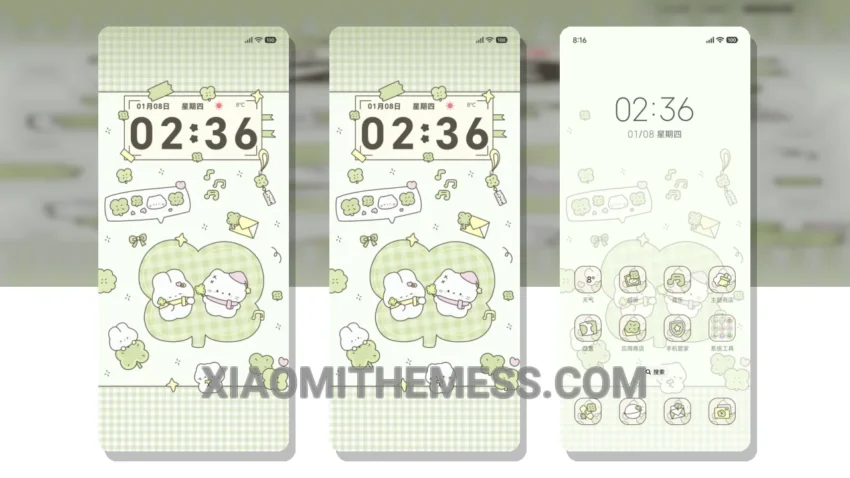
Get ready to experience the perfect blend of elegance and performance with the Lucky Clover theme, carefully crafted for Xiaomi devices. This theme is fully compatible with HyperOS, MIUI 12, MIUI 13, and MIUI 14, ensuring a seamless and premium UI experience.
The Lucky Clover theme translates to ‘Lucky Clover’ from Chinese, symbolizing good fortune and prosperity. With its pastel aesthetic and minimal vibrant design, this theme is sure to give your Xiaomi device a fresh and unique look.
Key Features and Details
One of the standout features of the Lucky Clover theme is its ability to provide a clean interface, making it easy to navigate and use your device. The theme also offers advanced widgets, interactive lockscreen widgets, and a custom boot animation, taking your android customization to the next level.
In terms of performance, the Lucky Clover theme is designed to be lightweight, ensuring no battery drain and a smooth experience. The theme also supports dark mode optimization, making it perfect for devices with AMOLED screens.
While the Lucky Clover theme offers a range of details, one potential caveat is that it may not be suitable for devices with low storage capacity, given its size of 11.89 MB.
To be honest, I was impressed with the Lucky Clover theme’s overall design and performance. The theme’s compatibility with HyperOS and various MIUI versions makes it a great option for Xiaomi device owners looking to customize their android phone. In my testing, the theme performed smoothly, and the customization options were easy to use.
Theme Information
🛠️ How to Install This MTZ Theme
- Download the MTZ file to your device.
- Open the official Themes app and go to your profile.
- Import & Apply the downloaded file.