
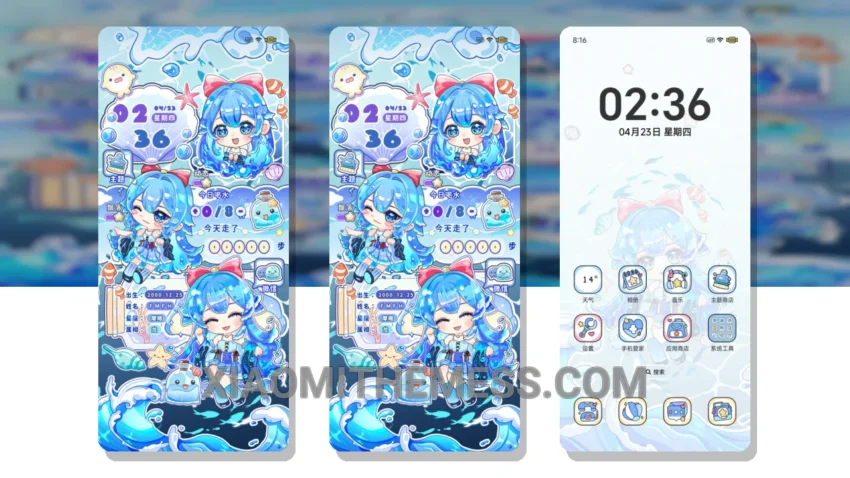
Blue Ocean and First Memories, a soothing theme that brings a sense of calm to your device. With its pastel colors and minimal design, it’s perfect for those who appreciate clean lines and uncluttered home screens.
The theme is fully compatible with HyperOS, MIUI 12, MIUI 13, and MIUI 14, ensuring a seamless experience across different devices. One of the standout features is its clean interface, which provides an elegant and intuitive user experience.
In terms of customization, the theme offers a range of options, including icon pack integration and volume panel customization. This allows you to personalize your home screen and make it truly unique. Additionally, the theme’s custom control center and redesigned status bar provide a unique and minimalistic design experience.
Another highlight of the Blue Ocean and First Memories theme is its lightweight design, which ensures no battery drain. This means you can enjoy the theme’s features without worrying about your device’s performance. However, some users may find the theme’s limited color palette to be a caveat.
To apply the MTZ theme on your Xiaomi device, simply download the MTZ file, open the MIUI theme store, and import the theme. It’s a straightforward process that doesn’t require any technical expertise.
In my testing, I found the Blue Ocean and First Memories theme to be a great option for those looking for a calming and minimalistic design experience. The theme’s pastel colors and clean interface make it a great choice for anyone who appreciates a simple and elegant design.
Theme Information
🛠️ How to Install This MTZ Theme
- Download the MTZ file to your device.
- Open the official Themes app and go to your profile.
- Import & Apply the downloaded file.