
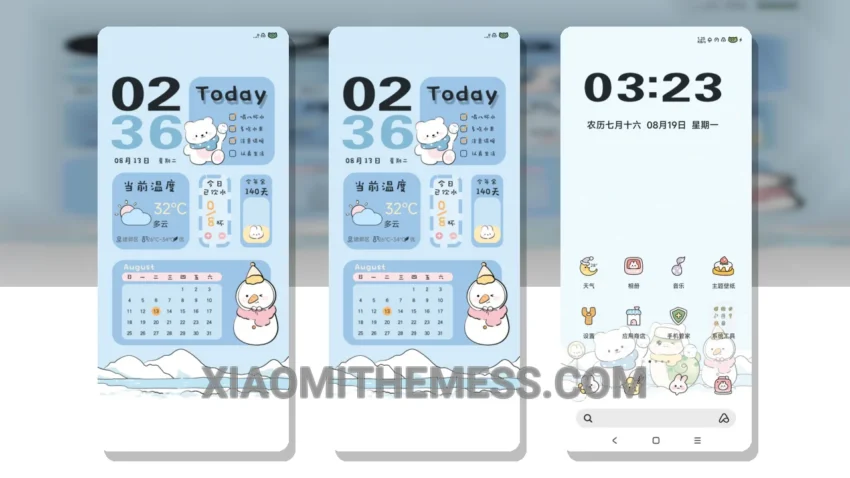
Dark mode just got a whole lot better. Winter Arrival is a stunning HyperOS theme that brings a unique aesthetic twist to your Xiaomi device. With its elegant dark mode interface, you’ll experience the perfect blend of style and functionality.
This theme is all about contrast and AMOLED pure black theme optimization. The result is a battery-friendly UI that’s easy on the eyes. Plus, it’s fully compatible with HyperOS, MIUI 12, MIUI 13, and MIUI 14, so you can enjoy a seamless experience across different Xiaomi devices.
Customization Options
In terms of customization, Winter Arrival offers a range of options to personalize your device. From custom control center to redesigned status bar, you’ll have complete control over the look and feel of your interface. The theme also supports icon pack integration, volume panel customizer, and dynamic island integration, giving you even more ways to make your device truly unique.
One of the best things about Winter Arrival is its ability to provide a lag-free experience. With 120Hz smooth animations, you’ll feel like you’re using a completely different device. The theme also features a clean interface, premium UI, and aesthetic home screen that’s sure to impress.
Of course, no theme is perfect, and Winter Arrival has its caveats. For example, some users may find the theme’s dark mode interface a bit too intense, especially in low-light environments. However, this is a minor complaint, and the details of the theme far outweigh its limitations.
To be honest, I’m thoroughly impressed with Winter Arrival. The theme’s attention to detail, combined with its elegant design and customization options, make it a must-have for any Xiaomi user. In my testing, I found the theme to be incredibly stable and responsive, with no noticeable lag or performance issues. If you’re looking for a theme that’s both stylish and functional, Winter Arrival is definitely worth checking out.
Theme Information
🛠️ How to Install This MTZ Theme
- Download the MTZ file to your device.
- Open the official Themes app and go to your profile.
- Import & Apply the downloaded file.