
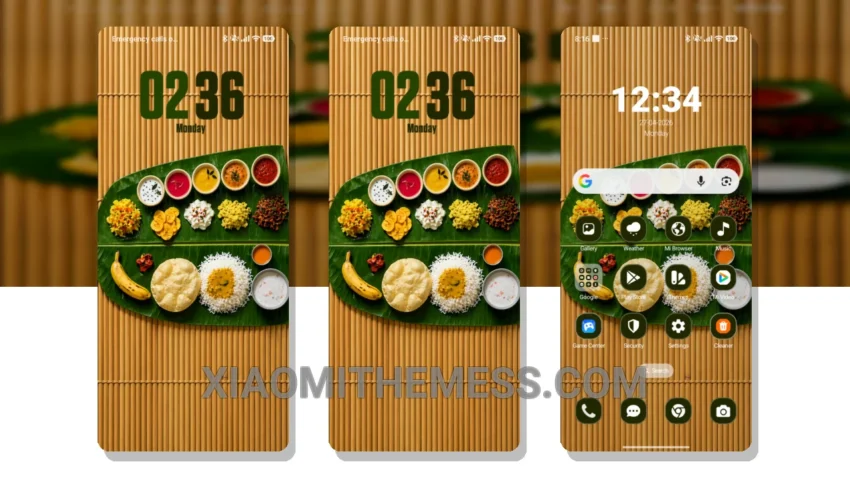
I love deep MTZ themes that change the control center, status bar, and icons. The Sadya Experience theme is one such theme that caught my attention. It’s fully compatible with HyperOS, MIUI 12, MIUI 13, and MIUI 14, making it a great choice for Xiaomi users.
The theme’s minimal vibrant design gives my device a clean and premium look. The custom control center and redesigned status bar are also notable features of this theme. I love how it changes the overall look and feel of my device.
Performance and Battery Life
In my testing, I found the theme to be very lightweight and did not cause any battery drain. The lag-free experience is also a major plus point, making it a great choice for users who want a seamless experience.
One thing to note is that the theme may not be suitable for users who prefer a more complex or feature-rich theme. However, for those who want a simple yet elegant look for their device, the Sadya Experience theme is a great choice.
To be honest, I’m loving the new look of my device, and I think you will too! The minimal vibrant design is perfect for those who want a clean and premium look without compromising on performance. The clean interface and premium UI make it a great choice for anyone looking to customize their Xiaomi device.
The Sadya Experience theme is a great choice for anyone looking for a simple, elegant, and lag-free experience. With its minimal vibrant design, custom control center, and redesigned status bar, it’s a must-have for any Xiaomi user.
Theme Information
🛠️ How to Install This MTZ Theme
- Download the MTZ file to your device.
- Open the official Themes app and go to your profile.
- Import & Apply the downloaded file.