
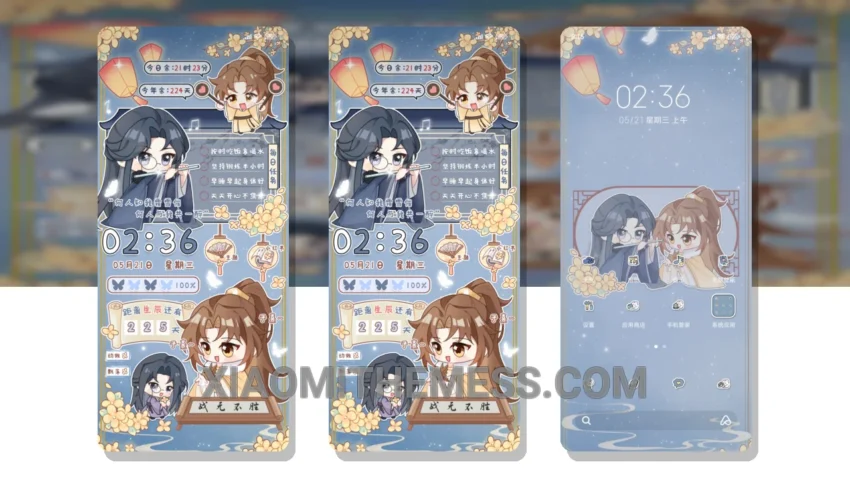
I love a good theme. River Night Flow is one. Very elegant. Easy to use. It’s a great choice for Xiaomi and Redmi phones, with a clean interface and minimal vibrant design.
The River Night Flow HyperOS theme is fully compatible with HyperOS, MIUI 12, MIUI 13, and MIUI 14, so you don’t have to worry about any compatibility issues. One of the best things about this theme is its support for dark mode optimization, which helps to reduce battery consumption and improve the overall user experience.
Customization Options
The River Night Flow theme is also highly customizable. You can change the icon pack, customize the control center, and even redesign the status bar to suit your preferences. The theme also comes with advanced widgets and interactive lockscreen widgets, making it a great choice for those who want a personalized home screen.
Fast and responsive, the theme doesn’t cause any lag or battery drain, making it perfect for daily use. However, one thing to note is that the theme may not be suitable for those who prefer a more complex design.
In my testing, I found the River Night Flow theme to be very impressive. It’s a great choice for anyone who wants a clean, elegant, and customizable theme for their Xiaomi or Redmi phone. The theme is available for download now, and with its dark mode optimization and customization options, it’s definitely worth checking out.
To be honest, I’m really impressed with the River Night Flow HyperOS theme. It’s a great choice for anyone who wants a clean, elegant, and customizable theme for their Xiaomi or Redmi phone.
Theme Information
🛠️ How to Install This MTZ Theme
- Download the MTZ file to your device.
- Open the official Themes app and go to your profile.
- Import & Apply the downloaded file.