
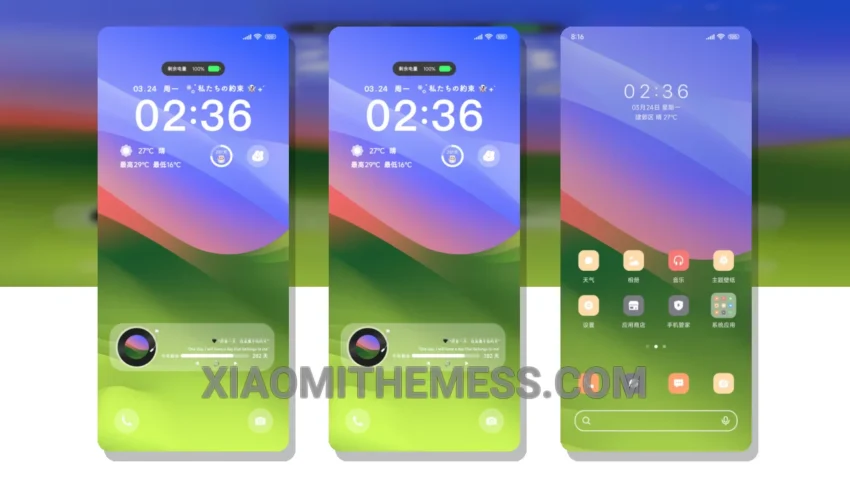
Simple. Elegant. Clean. That’s what I look for in a theme. Origin Minimalist is a great choice for those who want a fresh look on their Xiaomi or HyperOS device. This theme is designed to provide a unique and simple design that is easy to use and navigate.
The theme is fully compatible with HyperOS, MIUI 12, MIUI 13, and MIUI 14, making it a great option for a wide range of devices. I love how the clean interface makes it easy to find what you need and get things done.
Customization Options
In terms of customization, the Origin Minimalist theme offers a range of options to personalize your home screen and lock screen. You can choose from a variety of widgets, icon packs, and wallpapers to create a look that is all your own. It’s amazing how a few tweaks can make your device feel truly yours.
Another key detail of this theme is its lightweight design, which means it won’t slow down your device or drain your battery. This makes it a great option for those who want a theme that is both stylish and functional. No battery drain, no lag – just a smooth, lag-free experience.
With its clean interface, customization options, and lightweight design, the Origin Minimalist theme is a must-have for anyone looking for a simple, elegant, and functional theme for their Xiaomi or HyperOS device. The dark mode optimization is also a nice touch, making it easy on the eyes in low-light environments.
To be honest, I was impressed by the theme’s performance boost and how it enhanced my overall user experience. The 120Hz smooth animations and lag-free experience made it a joy to use. Overall, I’m very happy with the Origin Minimalist theme and would definitely recommend it to anyone looking for a great HyperOS theme.
Theme Information
🛠️ How to Install This MTZ Theme
- Download the MTZ file to your device.
- Open the official Themes app and go to your profile.
- Import & Apply the downloaded file.