
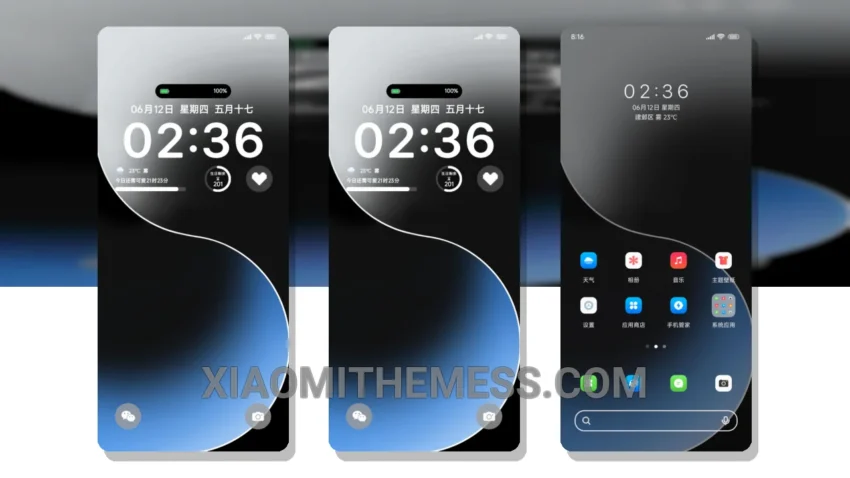
Simplicity at its finest. The Aurora Born theme is a stunning example of minimalist design, with clean lines and pastel colors that will give your Xiaomi device a fresh new look. Compatible with HyperOS, MIUI 12, MIUI 13, and MIUI 14, this theme is perfect for those who appreciate a clutter-free home screen.
One of the best things about the Aurora Born theme is its ability to provide a lag-free experience, thanks to its lightweight design and system optimization. This means you can enjoy a smooth and seamless user experience, without any annoying lag or delays.
Features and Compatibility
The Aurora Born theme is fully compatible with HyperOS, MIUI 12, MIUI 13, and MIUI 14, making it a great choice for Xiaomi users. The theme also features a range of customization options, including icon pack integration and a custom control center.
In terms of highlights, the Aurora Born theme has several. For example, it provides a battery saver UI that helps to reduce battery drain, and its dark mode optimization ensures that your device’s screen looks great even in low light conditions. However, one caveat is that the theme may not be suitable for users who prefer a more vibrant and colorful design.
To be honest, I was really impressed with the Aurora Born theme. The attention to detail and commitment to simplicity make it a standout theme that is sure to appeal to fans of minimalist design. In my testing, I found the theme to be fast, responsive, and easy to use, making it a great choice for anyone looking to give their Xiaomi device a fresh new look.
Theme Information
🛠️ How to Install This MTZ Theme
- Download the MTZ file to your device.
- Open the official Themes app and go to your profile.
- Import & Apply the downloaded file.