
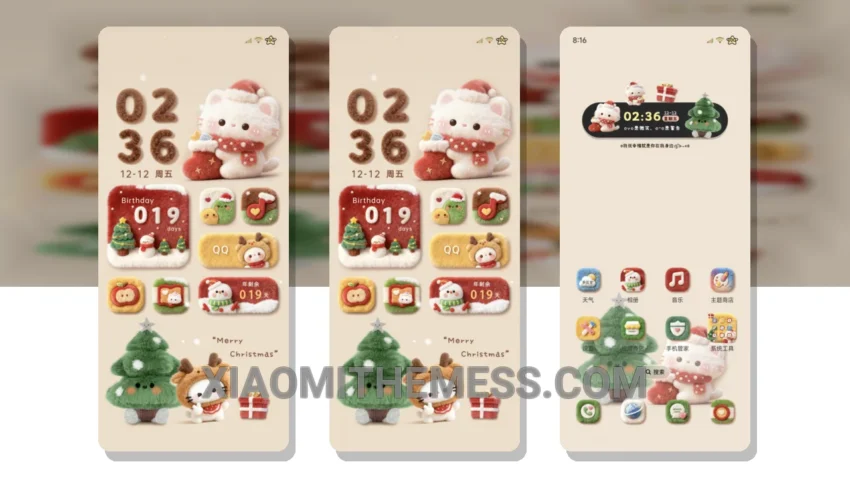
Christmas Cute Plush Icon is a great Xiaomi theme that brings a touch of festive cheer to your phone. With its cute plush icon design, this theme is perfect for the holiday season.
The theme is fully compatible with HyperOS, MIUI 12, MIUI 13, and MIUI 14, making it accessible to a wide range of Xiaomi and Redmi phone users.
One of the details of this theme is its lag-free experience, thanks to its lightweight design and system optimization. This means you can enjoy a smooth and seamless user experience without any performance issues.
Another highlight of the Christmas Cute Plush Icon theme is its support for 120Hz smooth animations, providing a premium UI experience. Additionally, the theme’s dark mode optimization helps to reduce battery drain, making it a great choice for those who want to conserve their phone’s battery life.
However, some users may find the theme’s design to be a bit too cute or childish, which could be a caveat for those who prefer a more minimalist or professional look.
In my testing, I found the theme to be easy to use and navigate, with a clean and intuitive interface. The theme’s aesthetic home screen and custom control center also add to its overall appeal.
Theme Information
🛠️ How to Install This MTZ Theme
- Download the MTZ file to your device.
- Open the official Themes app and go to your profile.
- Import & Apply the downloaded file.